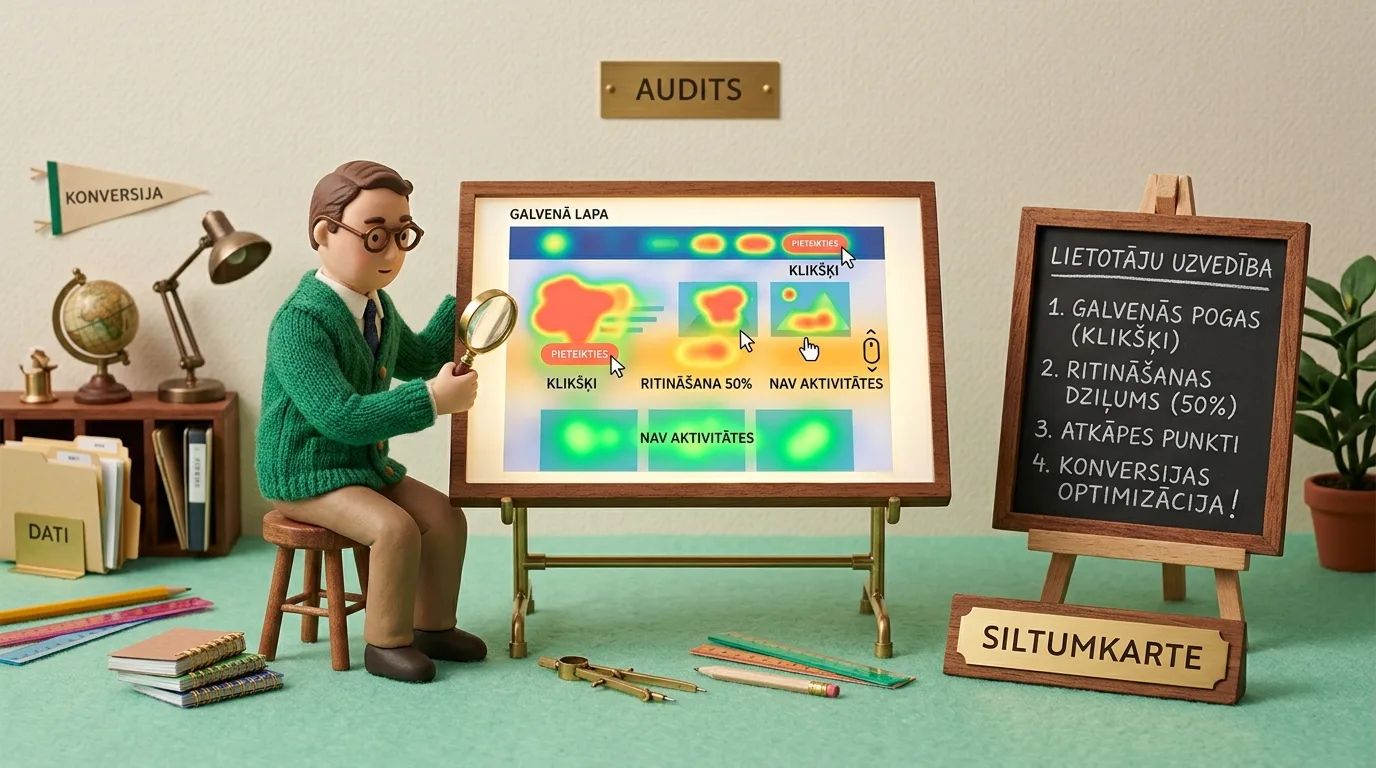
Most business websites lose 60% to 85% of potential buyers not because of a weak offer, but due to invisible UX friction points that standard Google Analytics 4 misses. Standard analytics only provides dry numbers on visitor counts and bounce rates, failing to answer what actually happened on screen before a user left. Implementing a user behavior heatmap and session recording audit reveals the true picture: inactive elements mistaken for buttons, scroll chasms where content loses half its readers, and form fields triggering rage clicks. In this article, we conduct an in-depth audit of the 5 most dangerous interface errors and provide an action plan to recover lost conversions.
Why Standard Analytics Misses User Frustration
When a business owner opens their Google Analytics 4 reports, they see charts detailing session counts, average engagement time, and conversion rates. If conversions start dropping, the standard conclusion is usually to 'increase advertising budgets' or 'pivot campaign targeting.' However, the underlying issue is rarely traffic quality - it is the website itself, where visitors encounter micro-friction and confusion.
That is why professional user behavior and UX analytics has become an essential foundation in modern digital architecture. While quantitative tools report on what happened, heatmaps and anonymized session recordings show why it happened. They reveal the true user journey: where the mouse hesitates, where the cursor clicks frantically, and at which sentence scrolling suddenly stops.
A shiny new, visually appealing website development project does not guarantee strong sales results if the design has not been field-tested with real users. Beautiful graphical solutions lacking a usability audit frequently turn into a fast way to burn marketing budgets.

"Google Analytics shows HOW MANY people left your website, but heatmaps reveal WHY they left. When we see that 40% of visitors desperately click an inactive banner or abandon a page at the third form field, the answer to 'why aren't we getting leads' becomes blatantly obvious in seconds."
Three Core Types of Heatmaps and Their Significance
To get a complete picture of user behavior, an audit combines three primary heatmap layers:
1. Click & Tap Heatmap: Using a color spectrum (from cool blue to fiery red), this map shows which elements visitors click on desktop or tap on mobile. It instantly reveals two dangerous phenomena: 'dead clicks' on unclickable objects and 'invisible buttons' that designers considered primary call-to-actions, but visitors simply scroll past.
2. Scroll Heatmap: This layer displays the percentage of visitors who scroll down to a specific section. It often turns out that fewer than 25% of visitors ever reach a carefully crafted pricing table or lead form, meaning 75% of your traffic never even sees your main call to action.
3. Move & Attention Map: Studies show a strong correlation (around 85%) on desktop devices between mouse cursor movement and eye tracking. This map reveals which text passages people read closely and which visual blocks eyes automatically skip as promotional noise.
Quantitative Analytics vs. Behavioral Heatmaps
To understand how these two analytics layers complement each other, let's examine them in a comparative breakdown:
| Analytical Aspect | Traditional GA4 Analytics | User Behavior Heatmaps |
|---|---|---|
| Core question asked | How many people arrived and left? | What exactly did people do and where did they get stuck? |
| Data format | Numbers, tables, charts, and metrics | Visual heat intensity and real session videos |
| Unclickable element tracking | None (only tracks pre-defined events) | Automatic (captures every false click) |
| Scroll accuracy | Broad thresholds (25%, 50%, 75%, 90%) | Continuous pixel-perfect scale |
| User frustration measurement | Indirect (only via high Bounce Rate) | Direct (rage clicks and chaotic cursor movement) |
| Optimization speed | Requires weeks of data collection and analysis | Friction points and blockers visible within an hour |
5 Critical Drop-Off Points Where Websites Lose Visitors
Through hundreds of website audits, we have identified the 5 most common areas where businesses unknowingly lose the most customers:
1. Dead Clicks on Fake Buttons
If a headline, badge, or icon in a website's design features bold colors, rounded corners, and shadows, the human brain automatically perceives it as a button. A user clicks it once, twice, nothing happens, and subconscious frustration sets in. Heatmaps highlight these zones in bright red. The solution is simple: either strip away the button-like visual styling or turn the element into an actual link leading to detailed information.
2. Mobile Rage Clicks
Rage clicks occur when a user frantically taps the exact same spot 4 to 10 times within 1 to 2 seconds. On mobile devices, this is usually caused by two factors: the button is too small (below the standard ergonomic 48-pixel requirement), or touch response delay exceeds 400 milliseconds. Read more about this ergonomics model in our study on mobile interface golden thumb zone ergonomics and why B2B forms lose 45% of submissions.
3. The Scroll Chasm
Scroll heatmaps frequently expose a dramatic drop-off: 100% of users land above the fold, but that number drops to 40% immediately upon the first screen shift. Why do 60% of people abandon the page? The culprit is almost always a 'visual dead end' or False Floor. When the bottom of the screen displays a solid white or dark background block with no visual cues suggesting content continues below, users subconsciously assume the page has ended and close the tab.
4. Form Field Friction and Form Abandonment
The lead form is the most sacred area of any commercial website. Session recordings reveal a brutal truth: every unnecessary field reduces conversion rates by 10% to 15%. Fields labeled 'Company Registration Number,' 'Physical Address,' or 'How did you hear about us?' are particularly problematic. A user begins filling out the form, hits a field they find confusing or lack immediate data for, and abandons the process forever. Streamline forms to 2 or 3 essential fields and add micro-reassurance copy, as detailed in our guide on removing post-click anxiety on your website using micro-reassurance text.
5. Overlapping Cookie Banners and Chatbots
Mobile screen real estate is strictly limited. When a massive cookie consent banner, a floating 'Call Us' widget, and an AI chatbot window trigger simultaneously at the bottom of the screen, they obscure up to 40% of the display and block access to main navigation or content. Heatmaps display a heavy concentration of accidental taps on these sticky elements, followed by immediate exit events.
Stark Behavioral Differences Between Desktop and Mobile
Company executives frequently sign off on website designs while looking at large office monitors where everything appears spacious and clear. However, heatmap audits reveal that 65% to 80% of B2B and service customers make their initial touchpoint on a mobile phone. On desktop, users comfortably browse text blocks, hover over icons, and compare details. On mobile, the attention window is a mere 3 seconds.
Mobile users do not scroll smoothly: they perform rapid thumb flicks. If the above-the-fold screen fails to deliver an immediate value proposition and a clear button, they return to search results. For this reason, heatmap analysis must never blend mobile and desktop traffic into one bucket - each device category demands an autonomous audit and tailored optimization plan.
Connecting Heatmap Insights to Google Tag Manager and GA4
The biggest mistake after conducting a heatmap audit is applying one-off fixes without a long-term monitoring system. To ensure resolved friction points do not resurface after future content updates, heatmap takeaways must be integrated into Google Tag Manager and Google Analytics 4 via Custom Events.
For example, if a heatmap reveals recurring dead clicks on pricing table icons, you can set up a trigger in Google Tag Manager that captures clicks on that specific element and sends a dead_click_detected event to GA4 reports. If that number spikes again over a month, your marketing team receives an automated alert before lead volume plummets. This two-tier data architecture ensures your website consistently maintains peak conversion readiness.
5-Step Action Plan for a Website Behavior Audit
To translate heatmap data into tangible conversion growth, we recommend following this 5-step audit process:
- Privacy-Safe Tool Setup: Connect a lightweight, GDPR-compliant behavioral analytics platform (such as Microsoft Clarity or Hotjar with masked user data).
- Collect Data for at Least 500 to 1,000 Sessions: Avoid rushing to conclusions after just 20 visits. Accumulate a statistically significant dataset across both desktop and mobile devices.
- Isolate Dead and Rage Clicks: Apply the 'Rage Clicks' filter and review at least 20 session recordings. You will instantly pinpoint technical bugs, unresponsive buttons, and flaws in content flow.
- Optimize Scroll Depth: If your scroll map shows a severe drop-off before key information, elevate your primary CTA button and value proposition above the fold, or add visual indicators encouraging further scrolling.
- A/B Testing and Fix Verification: Implement one major optimization at a time (e.g., removing 3 redundant form fields) and evaluate conversion performance over a 14-day window before and after the change.
Heatmap & User Behavior Audit Protocol
Frequently Asked Questions About User Heatmaps
Do heatmap tools slow down website loading speed?
Modern solutions like Microsoft Clarity or properly configured Hotjar load scripts asynchronously after the page structure is rendered. This ensures perceived page speed and Core Web Vitals remain unaffected.
Do session recordings violate GDPR and privacy regulations?
No, provided the platform is configured correctly. Leading behavioral analytics tools automatically mask sensitive data: personal details, passwords, phone numbers, and email addresses typed by users are obscured with asterisks or black boxes and are never stored on server databases.
How long does it take to gather reliable audit data?
For websites with moderate traffic (around 100 to 300 visits daily), 7 to 14 days is sufficient to gather statistically sound data and identify 90% of critical usability issues.
Want Independent, 100% Accurate Marketing Data Tracking Without Data Loss?
Schedule a 15-minute consultation. We will implement first-party server-side analytics and attribute actual purchases to your ad accounts.
Fixed pricing. No hidden fees or forced upsells.