
A historical analysis from autumn 2020 regarding changes in search query transparency. Today, we ensure budget control through negative keyword scripts, exact match types, and ad return analysis. Learn about our approach to Google Ads campaign management.
Key Takeaways
- New Google Restriction: Since September 1, 2020, the Google Search Terms report only displays queries with significant search volume, hiding 20% to 40% of paid clicks.
- Why It Is Critical: Advertisers continue to pay full price for every click but lose visibility into exactly which search phrases are consuming their advertising budget.
- Practical Protection: Universal negative keyword lists, analysis of organic search queries in Google Search Console, and stricter control over phrase and exact match types.
- Immediate Action: Stop relying on broad match without strict Target CPA or Target ROAS constraints.
On September 1, 2020, the Google Ads community received a cold shower. In a quiet system update, Google announced that the Search Terms Report would henceforth only show queries searched by a "significant number of users." In the name of user privacy? Officially, yes. But from a practitioner's perspective, it is another step toward a black box where the algorithm demands blind trust while the client pays the bill for empty clicks.
If you have read my previous article on how Google Ads has evolved from a simple two-pane interface to an autopilot over the last 10 years, you know my stance: automation is useful, but a blind autopilot without strict control measures guarantees wasted spend. In this article, we will look at how much data is actually hidden and how to protect your campaign budgets moving forward.
How much data is Google actually hiding?
In the first two weeks after the changes were implemented, marketing agencies and analysts worldwide conducted data comparisons. The picture is unpleasant: depending on the industry and campaign specifics, advertisers currently do not see from 20% to 40% of the search queries they have paid for.
This hits niche businesses and B2B service providers particularly hard. If you sell specific industrial equipment or complex IT solutions, a large portion of searches are long-tail queries. It was precisely in these queries that the most valuable discoveries used to hide: unnecessary words like "free," "jobs," "used," or "thesis," which, when added to negative keywords in time, could save hundreds of euros.
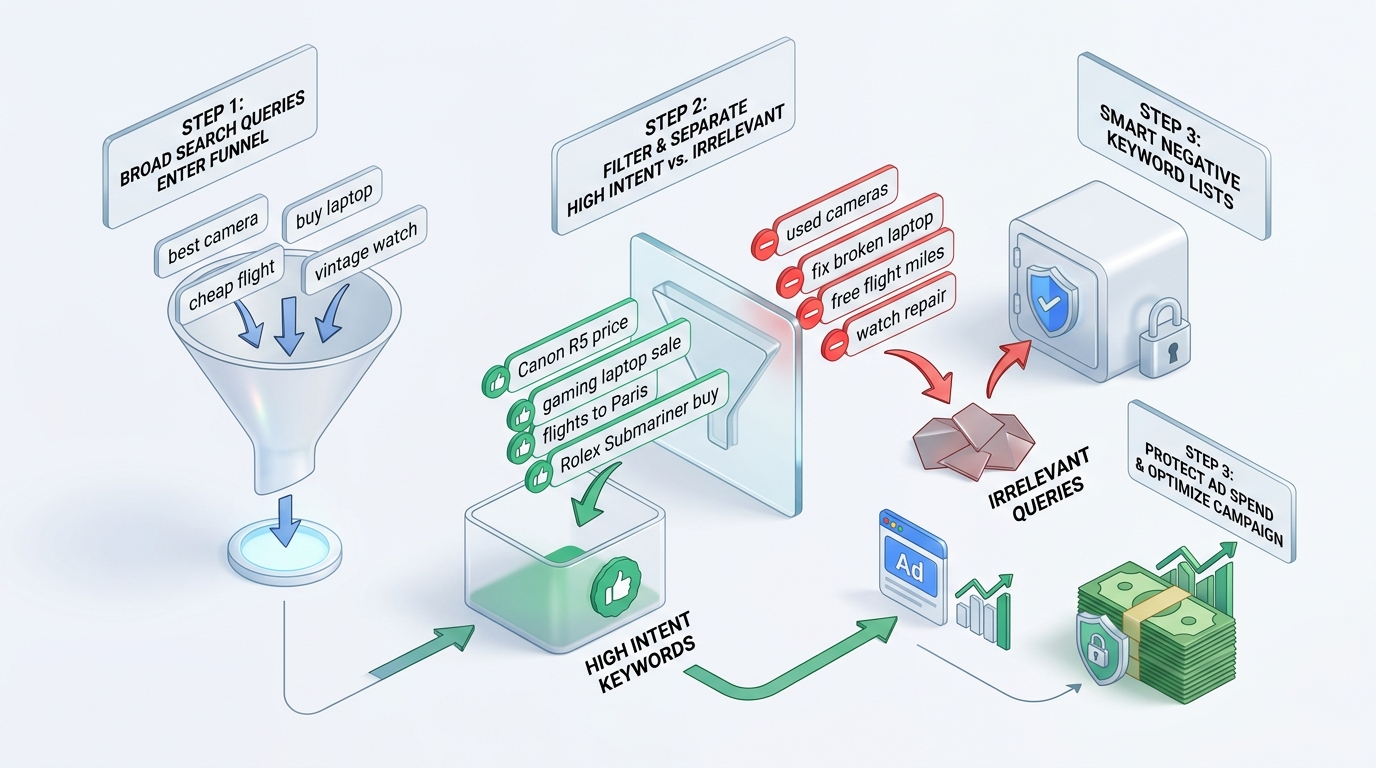
Comparison of Google Ads Search Terms Report changes
To better understand how the game dynamics have changed, let us look at the differences between the previous approach and the new reality:
| Aspect | Before September 2020 | After September 2020 |
|---|---|---|
| Data Visibility | Almost 95-98% of all clicks and their queries were visible in the report. | Only queries with significant volume are visible; 20-40% of queries are hidden in "Other search terms." |
| Negative Keyword Selection | Possible to precisely spot and block even single-click unwanted queries. | Reactive blocking has become limited; proactive and preventive negative keyword strategy is required. |
| Broad Match Risk | Moderate, as regular report cleaning allowed catching strange synonym associations. | High; broad match without strict control can spend budget on completely invisible clicks. |
| Required Additional Tools | Standard Google Ads interface was sufficient. | Google Search Console, Google Analytics search data, and pre-prepared negative keyword libraries. |
A 5-step plan for campaign control in the new environment
Criticizing Google is easy, but advertising campaigns must continue to run and results must be achieved. Here are five concrete steps we apply in our daily work to maintain maximum control over advertising investments:
1. Create and maintain universal negative keyword lists
Do not wait until an unwanted query appears in the report. Create global negative keyword lists at the account level, including words such as: free, job, vacancies, courses, download, pdf, reviews, used, complaints, forum, wikipedia. This prevents dozens of invalid clicks even before the campaign launches.
2. Use Google Search Console organic search query data
Although Google Ads hides data, Google Search Console still shows a wide spectrum of real user queries that lead to your website. Regularly review Search Console data: if you see that people find your website using words unrelated to your service, immediately add these words to your Google Ads negative keywords.
3. Prioritize modifiers, phrases, and exact match
If you are working with a limited budget, forget about standard Broad Match without a keyword modifier (+keyword) or phrase match ("keyword"). Broad match is currently too unpredictable a tool unless the account has hundreds of conversions per month and uses a full Smart Bidding model.
4. Compare Google Analytics and Google Ads search data
The internal site search report in Google Analytics provides direct insight into what users are looking for after arriving on your page. If an ad campaign brings a visitor to a product page, but they immediately search for a different unrelated category or service support, it is a clear signal of an inaccurate target audience.
5. Evaluate the efficiency of a single click, not just the average
When reviewing reports, focus on Cost Per Acquisition (CPA) and Return on Ad Spend (ROAS). If you see that campaign costs are rising but the number of conversions is falling, and a large portion of "Other search terms" appears in the report, it is a sign that the algorithm is experimenting with your money at the expense of unverified queries.
As we can see, nothing stands still in digital marketing. The key to success is not fighting platform changes, but the ability to adapt your processes faster than your competitors. If you want to ensure your Google Ads campaigns are not wasting budget on invisible queries, conduct a campaign audit this week!
Frequently Asked Questions about search term control
Will Google return full search term visibility?
Unlikely. Google justifies this decision by citing higher user privacy standards. Therefore, advertisers must learn to work proactively with negative keywords and more precise audiences.
How do I determine if my advertising funds are being wasted?
Check the difference between total campaign clicks and the sum of clicks shown in the search terms report. If the invisible portion exceeds 35% and the conversion rate is falling simultaneously, narrow down your match types immediately.
Should I completely abandon automated bidding strategies?
No, automated strategies (Target CPA, Maximize Conversions) are effective if the account has accumulated sufficient history (at least 30-50 conversions per month). For new campaigns with small budgets, manual bidding still provides better control.
Want to prevent advertising budget waste on irrelevant search queries?
Book a 15-minute strategy call. We will review your keyword and negative keyword lists to ensure every invested euro brings maximum return.
Fixed budget. No hidden extra fees or forced services.