

In the spring of 2024, the implementation of Google Consent Mode v2 was a legal deadline that caused significant industry concern. By 2026, consent mode has become an essential foundation of digital hygiene. Today, the industry's primary focus is on server-side data processing (sGTM) and continuous signal modeling without third-party cookies. Learn more about our data analytics and sGTM services.
The beginning of 2024 marked one of the most significant legal and technical shifts in digital marketing in recent years. The European Union's Digital Markets Act (DMA) imposes strict obligations on tech giants regarding user data processing. In response, Google announced a mandatory transition to Consent Mode v2 by March 2024. If your business uses Google Ads or GA4 and has not updated its consent mechanism, your advertising campaigns in Europe will lose the ability to build remarketing audiences and accurately track conversions.
Key Takeaways
- EU Digital Markets Act (DMA): Since March 2024, Google requires mandatory Consent Mode v2 support for all advertisers who wish to maintain audience targeting and conversion tracking in the European Economic Area.
- Two New Signal Parameters: In addition to the existing ad_storage and analytics_storage, two new parameters have been added: ad_user_data (permission to share user data for advertising purposes) and ad_personalization (permission for remarketing and personalization).
- Basic vs. Advanced Mode: In Basic mode, tags are completely blocked until consent is received, whereas in Advanced mode, cookieless pings are sent, allowing machine learning models to recover up to 70% of lost conversion data.
- Certified Consent Management Platforms (CMP): The safest path is to use a Google-certified tool (Cookiebot, Usercentrics, CookieYes) that automatically synchronizes with Google Tag Manager.
What is Consent Mode v2 and why has it become mandatory?
Google Consent Mode is not a new tool - its first version appeared back in 2020, but until now, it was a voluntary option for data modeling. Consent Mode v2 turns this framework into a mandatory gateway. It acts as an API link between your website's cookie banner and Google's marketing tags.
If a user clicks 'Reject', Consent Mode ensures that advertising cookies are not stored in the browser. Instead, anonymous, cookieless pings are sent, informing the system that an action occurred without sharing personally identifiable information. This allows Google Analytics 4 and GTM analytics machine learning algorithms to function, restoring the overall reporting picture.
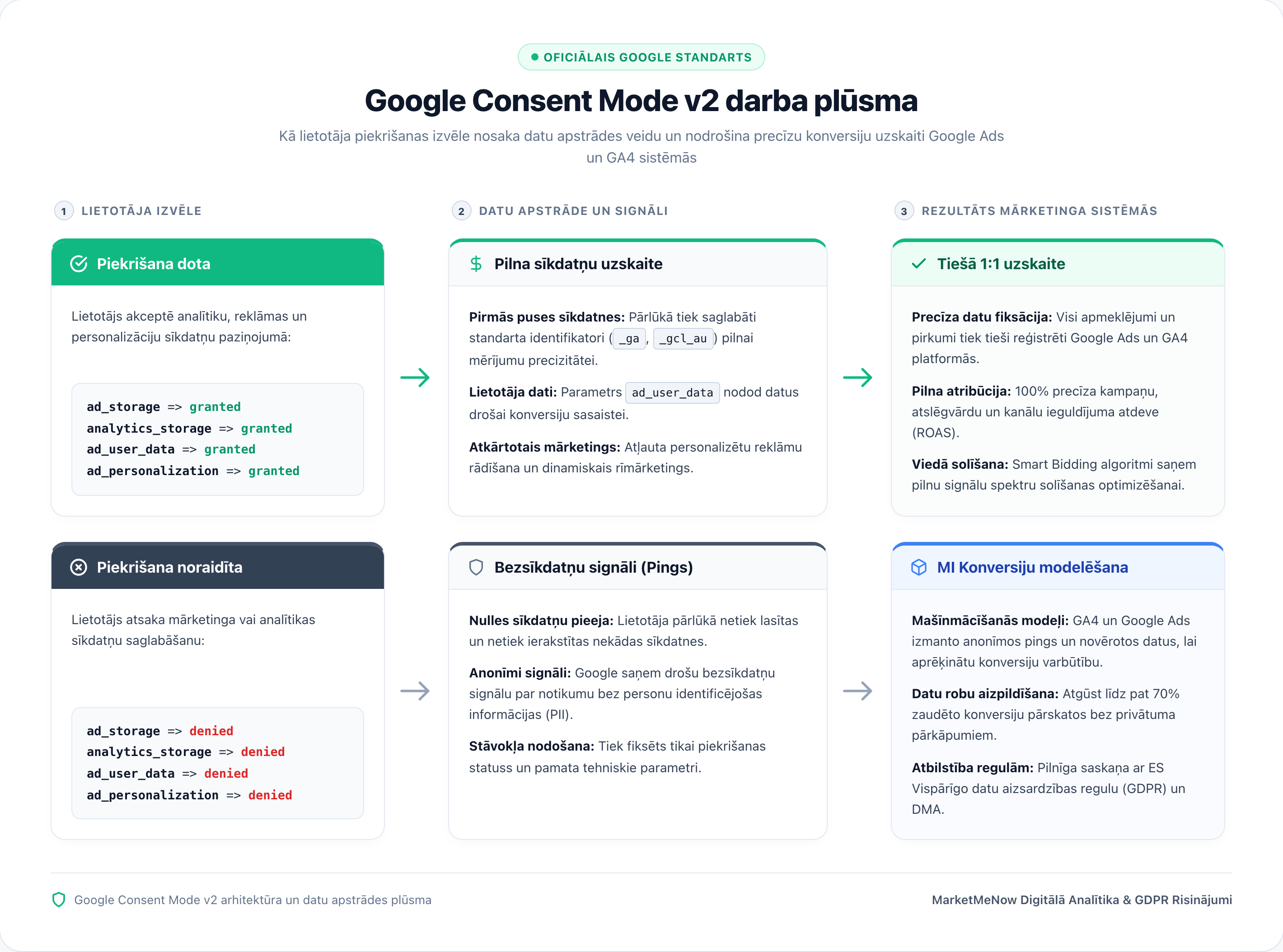
Four consent parameters: What changes in v2
In the classic Consent Mode, there were two main states: ad_storage (advertising cookies) and analytics_storage (analytics cookies). Version 2 introduces two additional parameters that are directly responsible for meeting privacy requirements in advertising networks:
| Parameter | Purpose and Functionality | Impact on Google Ads | Default Setting |
|---|---|---|---|
| ad_storage | Permission to store advertising cookies in the browser | If rejected, click cookies (gclid) are not used | denied |
| analytics_storage | Permission to collect website visit statistics | Affects GA4 session and page view measurements | denied |
| ad_user_data (NEW) | Permission to send user data for Google advertising purposes | Critical for Enhanced Conversions | denied |
| ad_personalization (NEW) | Permission to use data for personalized advertising and remarketing | Without this, remarketing audiences in the EEA are not populated | denied |
If a user consents only to analytics but refuses marketing, ad_user_data and ad_personalization remain set to denied. In this case, Google Ads campaigns will not receive permission to include this user in audience lists.
Basic vs. Advanced implementation: Which to choose
Google offers two integration models, and the choice depends on your company's legal policy and data requirements:
1. Basic Consent Mode: Google tags are not loaded at all until the user clicks 'Accept'. If the user rejects or ignores the banner, no data is sent. This is the strictest model, but it creates a significant 'blind spot' in reports because data for all users who do not accept the notice is lost.
2. Advanced Consent Mode: Tags are loaded immediately with a default state of denied. If consent is not given, the tags send lightweight, cookieless pings. These signals do not contain identifiers but allow Google's AI to accurately model conversions and session counts. In a business environment, this mode provides a much more complete picture, especially when combined with server-side data tracking.
Practical steps for implementation via Google Tag Manager
To correctly implement Consent Mode v2, it is recommended to follow this checklist:
1. Choose a CMP partner: Ensure your cookie consent tool supports the v2 standard. Cookiebot, CookieYes, and OneTrust offer ready-made GTM template integrations.
2. Enable Consent Overview in GTM: Turn on the consent overview in Google Tag Manager settings and verify that consent conditions are correctly linked to each tag.
3. Verify the Default State: Before any other code executes, the default state must be set in the dataLayer using gtag('consent', 'default', {...}).
4. Check signal transmission in GSC and Ads: In the 'Conversions' section of Google Ads, check the diagnostics for each action to see if the status 'Consent Mode is active' appears. Much like we explained in our review of the final 48 hours before the Universal Analytics shutdown, timely diagnostics prevent unpleasant surprises.
Frequently Asked Questions
What happens if I don't implement Consent Mode v2?
Your Google Ads campaigns will continue to run, but they will no longer be able to populate remarketing audiences from visitors in the European Economic Area. Additionally, the accuracy of Smart Bidding algorithms will decrease because conversion modeling signals will not be transmitted.
Do I have to buy a paid CMP tool?
Small websites can use basic plans with page view limits, or open-source solutions can be used if a developer can correctly configure dataLayer consent events according to Google's specifications.
Does Consent Mode replace legal consent requirements?
No, Consent Mode is only a technical mechanism for passing user choices to Google systems. The consent banner and privacy policy themselves must still comply with GDPR requirements.
Conclusions and Action Plan
Google Consent Mode v2 is not an optional module, but a mandatory standard for anyone seriously investing in digital advertising and data analytics. By configuring it now, you will ensure the stability of your campaigns and preserve valuable marketing data.
Does your website's data tracking and Google Ads meet European requirements?
Book a 15-minute strategy call. We will check your Consent Mode v2 and server-side sGTM readiness.
Fixed budget. No hidden fees or forced services.