

When Google and Yahoo introduced mandatory DMARC requirements in early 2024, it marked the end of casual email sending. In 2026, proper SPF, DKIM, and DMARC configuration is an absolute security foundation, complemented by BIMI brand logo verification and AI-monitored domain reputation. Learn more in our website maintenance services.
For years, email marketing was a relatively free environment where even imperfectly configured servers could deliver messages to a recipient's inbox. As of February 2024, that era has ended. The world's largest email service providers, Google (Gmail) and Yahoo, have joined forces to implement unified and strict authentication standards. If your domain's DNS settings do not have security protocols correctly configured, your invoices, order confirmations, and marketing messages simply will not reach customers.
Key Takeaways
- Stricter Rules from February 2024: Google and Yahoo are implementing mandatory authentication requirements for bulk senders (more than 5,000 emails per day), but these requirements will also affect small businesses.
- The Mandatory Trinity: SPF, DKIM, and DMARC: Without a valid SPF and DKIM signature, as well as a DMARC policy in the domain's DNS records, emails will be automatically routed to spam or completely rejected.
- Spam Complaint Threshold Below 0.3%: Senders must maintain a complaint rate below 0.1%, and it must not exceed 0.3% under any circumstances, otherwise the domain faces immediate blocking.
- One-Click Unsubscribe Link: All marketing and newsletter emails must support the RFC 8058 standard for an unsubscribe link directly in the email header.
Why Google and Yahoo Are Changing the Rules
The main reason is the fight against phishing and domain spoofing. Fraudsters often send emails pretending to be trusted brands because the simple SMTP protocol itself does not verify the sender's true identity. The new requirements demand cryptographic proof that the message genuinely originated from the specified domain.
These changes are closely related to how modern email marketing automation is built. An attractive message design is no longer enough - the technical infrastructure must be flawless.
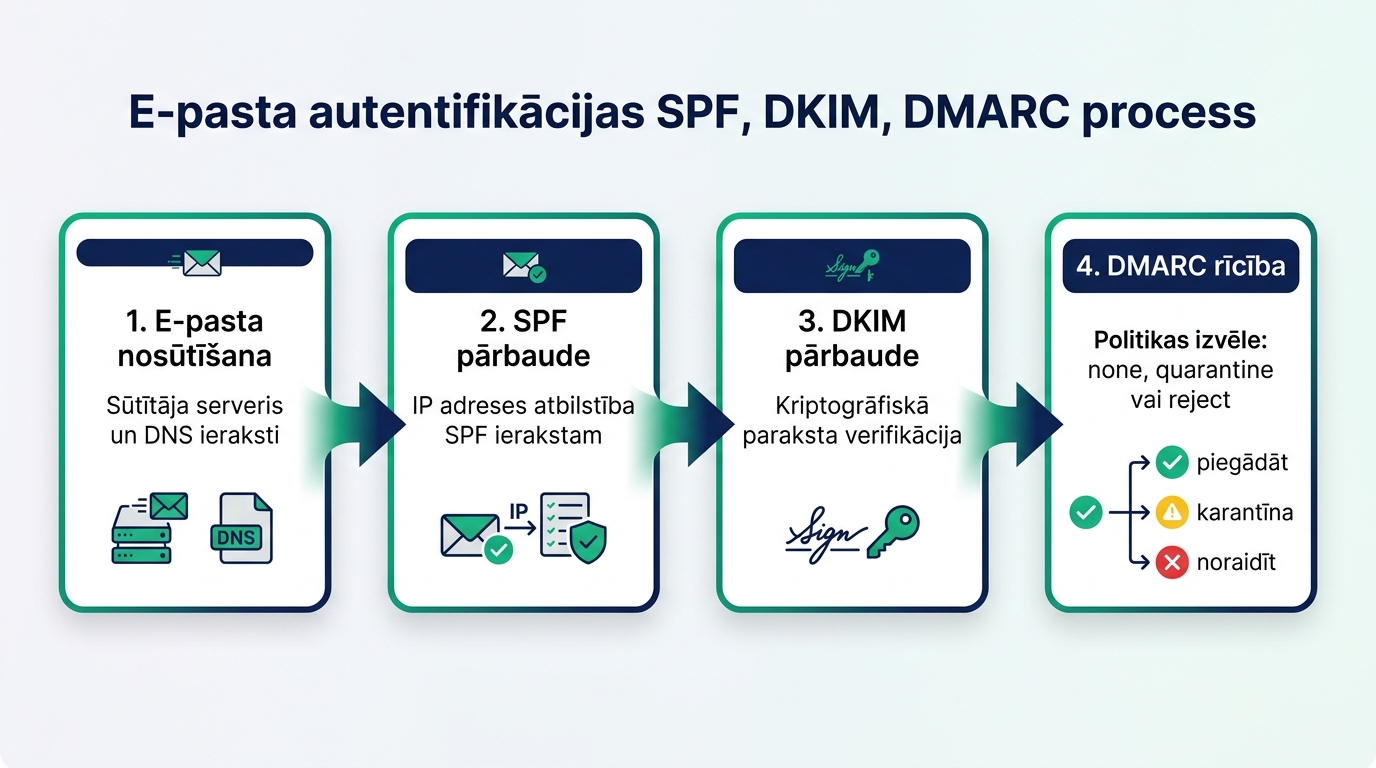
The Three Main Authentication Pillars: SPF, DKIM, and DMARC
For your email to be considered legitimate, all three mutually complementary mechanisms must be implemented:
| Protocol | What it Does | Where it's Configured | Example Record |
|---|---|---|---|
| SPF (Sender Policy Framework) | Defines authorized server IP addresses allowed to send emails on behalf of the domain | Domain DNS (TXT record) | v=spf1 include:_spf.google.com ~all |
| DKIM (DomainKeys Identified Mail) | Adds a digital signature to the email, guaranteeing that the content has not been modified in transit | Domain DNS (TXT / CNAME) | k=rsa; p=MIGfMA0GCSqGSIb3... |
| DMARC (Domain-based Message Authentication) | Specifies how the recipient's server should handle emails if SPF or DKIM checks fail | Domain DNS (TXT record) | v=DMARC1; p=quarantine; rua=mailto:... |
Many companies mistakenly believe that SPF alone is sufficient. In reality, without the DMARC protocol, the recipient's server doesn't know how to handle forged messages, often proactively rejecting legitimate ones as well.
Step-by-Step Guide to DMARC Implementation Without Losing Emails
DMARC implementation should not be rushed. A policy that is too strict from day one can block important accounting or CRM system notifications. A phased approach is recommended:
Phase 1 - Monitoring (p=none): Create a TXT record with the policy p=none and specify an email address for receiving reports (rua parameter). In this phase, no emails are blocked, but you receive XML reports on all servers sending messages on your behalf.
Phase 2 - Identification and Alignment: Review the reports and ensure that all legitimate services (Mailchimp, Klaviyo, Google Workspace, website contact forms) are correctly included in SPF and signed with DKIM. Regular website maintenance and server audits are useful here to check CMS outgoing email settings.
Phase 3 - Quarantine (p=quarantine): Once all sources are confirmed, change the policy to p=quarantine. Suspicious emails will now go to recipients' spam folders, not the main inbox.
Phase 4 - Full Protection (p=reject): The ultimate goal is a p=reject policy, which completely prevents the delivery of unauthenticated emails, guaranteeing 100% brand reputation protection.
One-Click Unsubscribe Link and Spam Control
In addition to DNS records, Google and Yahoo require two essential things:
One-Click Unsubscribe: For marketing messages, the unsubscribe process must be immediate. The user should not have to enter a password or visit complex questionnaires. If you use modern email tools, this feature is automatically provided with special headers (List-Unsubscribe-Post).
Spam Complaint Rate Monitoring: Use Google Postmaster Tools to monitor your domain's reputation. If the complaint percentage exceeds 0.1%, it's an alarm signal about audience quality or unclear content. As described in our article on strengthening WordPress website security, technical orderliness also prevents malicious use of the server for sending spam.
Frequently Asked Questions
Do the new requirements apply to me if I only send a few dozen emails a day?
Yes! While the 5,000 email limit per day applies to the stricter DMARC requirement and unsubscribe link, Google applies basic SPF and DKIM requirements to all domains. Without them, even daily correspondence with partners can end up in spam.
How can I check if my DMARC records are correct?
You can use testing tools like MXToolbox or Mail-tester by sending a test email and receiving a detailed protocol report.
How long do DNS changes take to become effective?
DNS record updates typically take from 15 minutes to 24 hours, depending on the domain's TTL (Time To Live) parameter.
Conclusion
Organizing email authentication is not a one-time checkbox, but a fundamental infrastructure requirement in modern business. Conduct a DNS audit of your domain immediately to guarantee secure communication with customers and maintain high sales effectiveness.
Want to ensure your company's emails always reach customer inboxes?
Book a 15-minute technical consultation. We'll organize your domain's DNS records, DMARC security, and website email deliverability.
Fixed budget. No hidden fees or forced services.