

Since the official rollout of INP in the spring of 2024, web developers can no longer ignore JavaScript latency and interactivity bottlenecks. In 2026, every click and button press is measured in real-time, directly impacting conversion rates and search rankings. Learn more about our web development services.
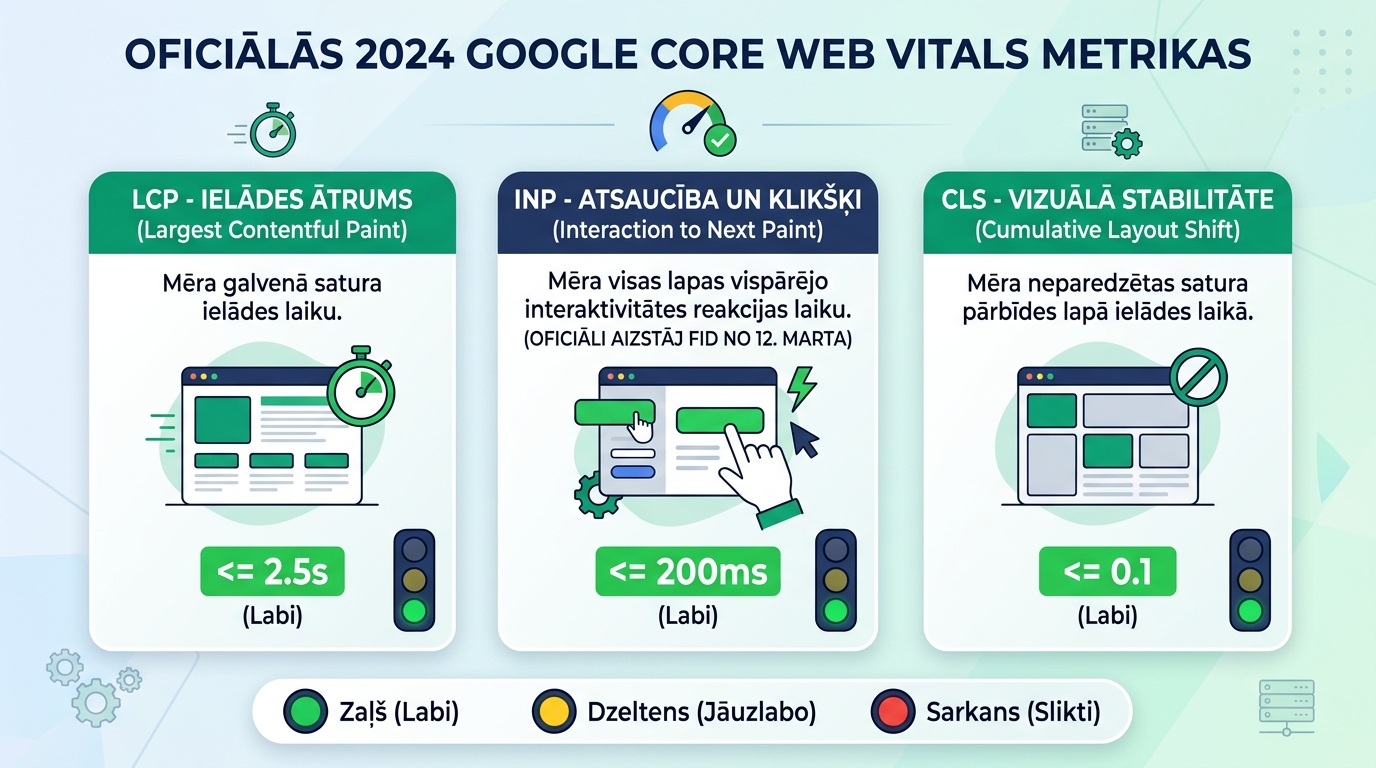
March 12, 2024, marked a significant turning point in web performance standards: Google officially removed First Input Delay (FID) from its Core Web Vitals system and replaced it with Interaction to Next Paint (INP). This means website responsiveness is no longer judged by the first moment of interaction, but by the performance of all interactions throughout the user's visit. Early observations show that thousands of site owners faced unpleasant surprises in their Search Console reports, as long-ignored JavaScript delays suddenly became an official ranking obstacle.
Key Takeaways
- Historic Milestone on March 12: Google officially completed the transition to Interaction to Next Paint (INP), removing the legacy First Input Delay metric from Search Console and PageSpeed Insights.
- Day One Reality: Many websites that previously boasted 100% green scores suddenly faced yellow and red warnings on mobile devices.
- Three Main Bottlenecks: Slow INP is most commonly caused by hamburger menu delays, carousel shifts, and cart update requests in e-commerce stores.
- Optimization Priority: Properly deferring JavaScript and separating style calculations from user clicks allows you to return INP to the green zone (under 200ms).
What the first field data shows after the official rollout
Initial data aggregated by the world's leading performance analysts after March 12 reveals a concerning trend: while over 85% of websites meet the required 200-millisecond threshold on desktop, this figure drops to 60-65% in mobile environments.
The primary reason is the limited processing power of smartphones. If a page is saturated with third-party scripts, animations, and complex layouts, the mobile device cannot simultaneously execute code and instantly repaint the screen. As a result, the button appears "frozen," and the user clicks it again, triggering a cascade of additional errors.
Three common INP issues and their diagnosis
When analyzing website performance, three standard elements consistently "kill" the INP score:
| Element Type | Why it causes INP delay | Typical Delay | Recommended Technical Fix |
|---|---|---|---|
| Mobile Menu (Hamburger) | Hundreds of DOM elements are loaded and recalculated upon clicking | 350 - 700 ms (Red) | Pre-render the menu, toggle only the CSS visibility class |
| Add to Cart | Synchronous AJAX requests block screen animation | 400 - 900 ms (Red) | Show immediate visual state (Optimistic UI), send data in background |
| Image Galleries & Sliders | Heavy JS libraries recalculate the entire page layout | 250 - 450 ms (Yellow) | Replace with modern CSS Scroll Snap without extra JS |
| Accordions & FAQs | Excessive JS manipulation of content height | 220 - 380 ms (Yellow) | Use native HTML5 and tags |
This is precisely why modern website speed optimization no longer stops at image compression but involves deep refactoring of JavaScript code.
How to maintain and recover green rankings
To ensure your site maintains high search rankings, we recommend implementing the following measures:
Use a modern CMS foundation: Sites built on clean code or modern block themes consume 5 times less JavaScript than pages bloated with dozens of visual plugins. As demonstrated by our professional web development, clean code architecture solves INP problems at the root.
Keep your server and plugin environment tidy: Outdated extensions often run unnecessary scripts in the background. Regular website maintenance and code audits ensure that only truly necessary modules remain on your site.
As we explained in our technical analysis on how the new Core Web Vitals metric INP affects speed, timely improvements protect you from unexpected ranking drops.
Frequently Asked Questions
Does a poor INP score immediately mean a drop in traffic?
Google algorithms use Core Web Vitals as one of several ranking factors. However, if a competitor has equivalent content but a better INP score, Google will favor the faster and more responsive site.
Why does the Lighthouse score differ from Search Console data?
Lighthouse is a lab test on a specific computer and simulated network, whereas Search Console displays real user data (CrUX) from the last 28 days across a wide variety of smartphone devices.
Is it enough to optimize only the homepage?
No! The INP assessment is taken from all pages of the site. Often, e-commerce category and product pages are the slowest and cause the most significant issues.
Conclusion
The official rollout of INP is not a passing trend, but a new fundamental standard for internet usability. Check your site's metrics in Search Console today and ensure your code is lightweight.
Does your website's interactivity meet Google Core Web Vitals standards?
Book a 15-minute technical consultation. We will optimize your code load so your site loads and reacts instantly.
Fixed budget. No hidden fees or forced services.