

Preparing for the INP rollout in March 2024 was a significant step toward better user experience. In 2026, INP is one of Google's strictest ranking factors, where lightning-fast code execution (<100ms) is achieved through lightweight architecture and the removal of unnecessary third-party scripts. Learn more in our website speed optimization services.
With only a few weeks left until Google officially integrates the new Interaction to Next Paint (INP) metric into its search algorithms, the clock is ticking. On March 12, 2024, the legacy First Input Delay (FID) metric was permanently retired. While FID was relatively easy to satisfy, with over 90% of websites hitting the green zone, INP is a much stricter judge. Early analytics data shows that nearly 35% of all websites globally currently fail to meet the 200-millisecond standard, which will directly impact their Google search rankings.
Key Takeaways
- Official Deadline: March 12, 2024: Interaction to Next Paint (INP) became an official Google Core Web Vitals metric, fully replacing the legacy FID (First Input Delay).
- Difference between FID and INP: FID only measured the very first user click during page load. INP monitors every single user interaction throughout the entire session (menus, buttons, accordions, filters).
- Threshold for good user experience: To achieve a green rating, the worst interaction for 75% of visitor sessions must be under 200 milliseconds.
- Root cause - overloaded Main Thread: Slow INP is usually caused by heavy third-party scripts, massive JavaScript libraries, and unoptimized React or DOM re-rendering processes.
Why FID was incomplete and what INP actually measures
The old FID metric created a false sense of security. It only recorded the milliseconds from the moment a user first touched the screen until the browser even began processing the event. It ignored the actual code execution time and how long it took for the user to see a visual response.
INP measures the full cycle: from the user's click to the rendering of the next frame on the screen (Next Paint). Furthermore, it is not limited to the first click; it evaluates all interactions: opening a mobile menu, adding an item to the cart, scrolling through an image carousel, and using search filters. If even one frequently used button on your site "freezes" for half a second, your entire INP score falls into the red zone.
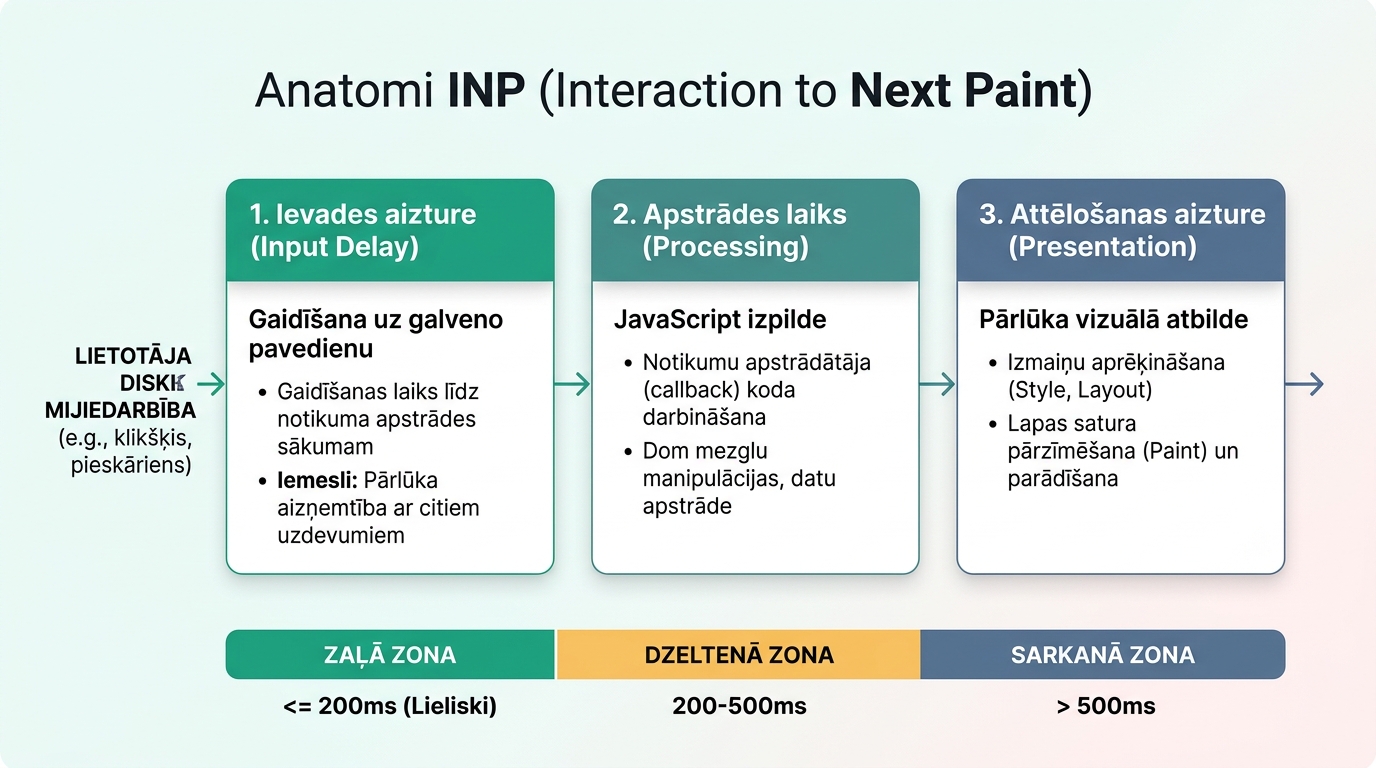
The three INP time components and their optimization
Every user interaction consists of three stages:
| INP Phase | What happens in the browser | Main cause of delay | Technical solution |
|---|---|---|---|
| 1. Input Delay | Time from click to code execution | Browser main thread busy with other Long Tasks | Reduce background script volume, defer third-party codes |
| 2. Processing Time | Time while JavaScript event handler executes | Complex DOM calculations, heavy loops, or synchronous requests | Optimize algorithms, use requestIdleCallback or Web Workers |
| 3. Presentation Delay | Time while browser recalculates styles and repaints screen | Excessively large DOM tree, CSS animation layout shifts | Use CSS transform and opacity for visual transitions |
To prevent these delays, professional website speed optimization is required, focusing not just on file compression, but on the architecture of JavaScript code execution.
Practical code fixes for WordPress and custom sites
To prepare your site, implement these three improvements:
1. Break up long tasks with yieldToMain(): If a JavaScript function takes more than 50 milliseconds, it blocks the user interface. Use modern scheduler.yield() or setTimeout to allow the browser to render intermediate frames before finishing heavy data processing.
2. Audit third-party scripts: Chat widgets, heat map recorders (Hotjar), and marketing pixels often consume 70% of total CPU power. Move non-critical scripts to trigger after user interaction or use GTM 'Consent Initialization' and 'Window Loaded' triggers.
3. Avoid heavy page builders: Legacy themes with hundreds of included plugins create thousands of unnecessary DOM nodes. As we explained in our detailed review on how the new Core Web Vitals metric INP affects speed, transitioning to clean and modern code is the key to long-term success. This is where structured modern website development on lightweight base themes helps.
A regular technical SEO audit helps identify problematic templates and page elements before Google lowers your page ranking.
Frequently Asked Questions
How can I measure my site's real INP score?
Open the 'Core Web Vitals' section in Google Search Console. There, you can see real user field data (CrUX). For lab tests, you can use the 'Performance' panel in Chrome DevTools and Lighthouse 10+.
Does INP only affect mobile users?
No, INP is measured on both mobile and desktop devices. However, on mobile devices with weaker processors, INP issues appear 3 to 5 times more severely.
Is installing a caching plugin enough?
No! Caching helps improve TTFB (Time to First Byte) and LCP, but it does not reduce the JavaScript processing load when a user clicks a button.
Conclusion
The implementation of INP sets a new quality standard for the global web: pages must not only be fast to load but also lightning-responsive at every step. Check your site's metrics now to ensure you maintain strong and stable rankings.
Want a lightning-fast website without JavaScript delays and lost leads?
Request a 15-minute consultation. We will perform a Core Web Vitals and INP audit so your users receive an instant response.
Fixed budget. No hidden fees or forced services.