
In 2026, autonomous AI agents and Make/n8n integrations allow taking over up to 70% of routine manual lead qualification. Learn more in our Business Process Automation section.
Sales and customer support teams often spend up to 40% of their working hours manually transferring data from emails to CRM, drafting standard responses, and sorting incoming inquiries. In 2025, local artificial intelligence assistants can handle this routine entirely. In this guide, we explore how secure CRM integration speeds up customer service and eliminates human error.
Why Manual Data Entry Slows Down Business Growth
Every delayed call or late response to a customer inquiry directly reduces the probability of closing a deal. Research shows that a prospect who receives a professional response within the first 5 minutes is several times more open to collaboration than one who waits several hours. However, teams are frequently overwhelmed with repetitive tasks.
By implementing well-planned CRM integration and process automation, incoming information is structured immediately upon receipt. This means team members see a ready-made client profile on their dashboard with clearly defined needs and priorities.
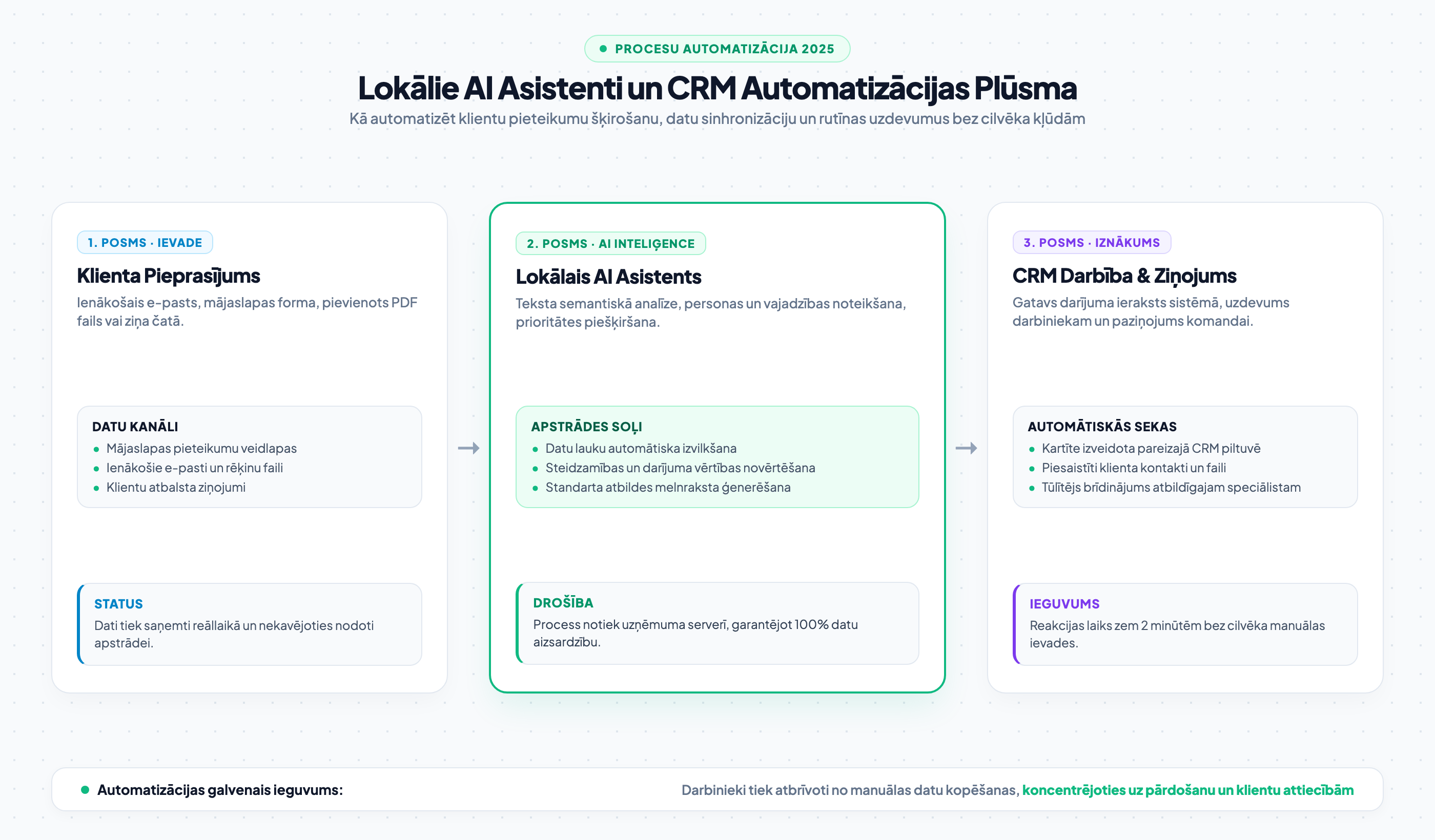
What a Local AI Agent Can Actually Achieve
Modern smart business assistants are no longer simple keyword bots. They can analyze unstructured text, extract company details from attachments, evaluate project scale, and even assess client sentiment. The assistant can prepare a personalized draft response that a specialist can approve with a single click.
A significant advantage is that such a system operates continuously - even outside business hours and on weekends. Clients instantly receive confirmation and clear next steps, building confidence in the company's high service standards.

“An employee's most valuable asset is client conversation and strategy, not manually copying data between spreadsheets and systems. Automation is not designed to replace employees, but to free them from tedious routine.”
How to Implement a CRM Assistant Step by Step
As we described in our guide on how to automate lead processing systems, the key to successful integration is a gradual approach. You do not need to automate all processes at once. Start with incoming email classification and contact creation.
Once the team gets used to the system and verifies its accuracy, you can connect additional logic: automatic draft invoice preparation, sending reminders for unpaid proposals, and synchronizing internal statuses.
- Response time: Check how long it currently takes your team on average to respond to a new inquiry on the website.
- Data loss: Ensure that all leads from emails and social media are centralized into a single CRM system.
- Routine volume: Determine how many hours a week your sales specialists spend on manual data entry.
Frequently Asked Questions About AI Assistants and CRM
Which CRM systems can local AI assistants be connected to?
Local assistants can be integrated with any modern system featuring an open API (such as HubSpot, Pipedrive, Zoho, ActiveCampaign, or custom proprietary databases).
Will the client notice that initial processing was handled by artificial intelligence?
Responses generated by the assistant are tailored specifically to your company's communication style and tone. Furthermore, at critical stages, the final dispatch of a reply can always be confirmed by a human team member.
How secure is customer information in such an integration?
When using local or private server models, all processing takes place within your infrastructure perimeter, fully complying with GDPR requirements and preventing data leaks to third parties.
Conclusion and Next Steps
Automation is the most effective way to boost company productivity without expanding payroll. By entrusting routine tasks to reliable AI assistants, your team gains time for what truly generates revenue - client conversations and business growth.
Want to automate customer service and CRM lead entry?
Book a 15-minute consultation. We will design a custom AI assistant for your business and integrate your systems into a unified workflow.
Fixed budget. No hidden extra charges or pushed services.