

INP (Interaction to Next Paint) officially replaced FID in March 2024. In 2026, Google evaluates real-world user experience: any delay over 200ms at the moment of a click lowers your site's technical score, which is why clean Vanilla JS and server-side FastCGI micro-caching are the only long-term solutions. Explore our speed optimization services.
Website usability and performance have been direct ranking factors in Google's search algorithms for years. However, the existing Core Web Vitals metric, FID (First Input Delay), was long criticized for being too superficial: more than 90% of sites passed it without difficulty, even though in reality, pages often noticeably "froze" when opening menus or clicking buttons. Google has introduced a new metric - Interaction to Next Paint (INP) - and developers have exactly nine months to clean up their code.
Key Takeaways
- Replacing FID with INP: Google has officially confirmed that the old First Input Delay (FID) has been replaced by the much stricter Interaction to Next Paint (INP).
- Full Session Response Measurement: Unlike FID, which only measured the very first click, INP evaluates all interactions during a page visit and records the slowest response.
- Critical Threshold Under 200ms: For a site to be considered fast and receive SEO ranking benefits, the visual response for 75% of user interactions must occur in under 200 milliseconds.
- Optimizing the Main Culprits: Most INP issues stem from heavy JavaScript event listeners, third-party analytics scripts, and massive DOM tree sizes.
What is INP and why website speed optimization is becoming critical
First Input Delay (FID) measured only one thing: how many milliseconds passed from the moment a user first touched the page until the browser was able to start processing that event. FID did not measure the time it took for visual changes to actually appear on the screen and completely ignored all subsequent actions during the session.
Interaction to Next Paint (INP) is a much fairer and stricter metric. It evaluates all user interactions (button clicks, opening links, filling out forms, expanding accordions) and measures the time until the next frame painted by the browser (Next Paint). The worst or one of the worst interactions becomes the page's final INP score.
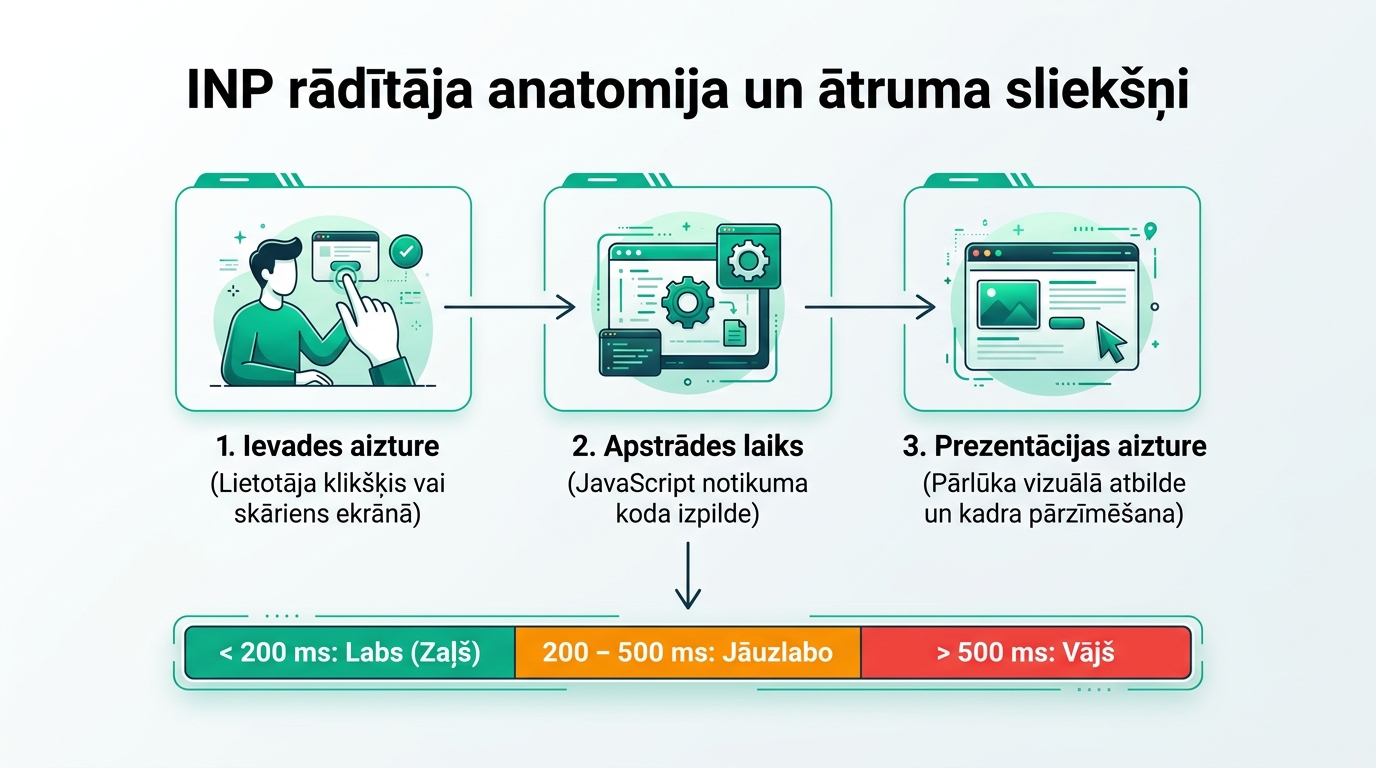
The three components that make up INP time
To understand exactly where performance is lost, the INP measurement is divided into three stages:
1. Input Delay: The time from the physical click until the JavaScript event handler starts working. This delay is most often caused by other background scripts that are simultaneously burdening the browser's Main Thread.
2. Processing Time: The time required for the JavaScript code itself to execute the necessary functions (data calculations, state changes, DOM manipulations).
3. Presentation Delay: The time the browser needs to recalculate page styles, perform layout, and paint the new pixels on the screen.
How to check and evaluate your site's INP today
Google already displays INP data in the 'Core Web Vitals' section of Google Search Console, as well as in the PageSpeed Insights tool. Scores are divided into three categories:
| INP Value | Rating | User Impact | Action |
|---|---|---|---|
| Up to 200 ms | Good (Green) | Lightning-fast response, fluid interface | Maintain current code quality |
| 200 - 500 ms | Needs Improvement (Yellow) | Noticeable lag, button "sticking" | Code refactoring required |
| Over 500 ms | Poor (Red) | Annoying slowness, double-clicks, cart abandonment | Urgent technical audit |
Practical steps for JavaScript optimization in WordPress and custom sites
To reduce INP, where a stable server and website maintenance provide the foundation, follow these steps:
Reduce Long Tasks: Any JavaScript task that takes longer than 50ms blocks the main thread. Break down heavy calculations into smaller chunks using requestAnimationFrame, setTimeout, or the new scheduler.yield() API.
Defer non-critical third-party code: Live chat widgets, heatmaps (Hotjar), and social media pixels often take over the main thread. Load them only after the user has started scrolling the page, or use Web Workers.
Avoid Layout Thrashing: Do not perform DOM read and write operations interchangeably in a loop, as this forces the browser to perform Forced Synchronous Layout.
Frequently Asked Questions
When will INP officially become a search ranking factor?
In preparation for this step (which we warned about in our guide on Core Web Vitals technical audits), Google has set the deadline as the official moment when FID will be completely removed from Core Web Vitals and replaced by INP.
Does INP only affect mobile devices?
No, INP is measured on both mobile and desktop devices, but INP issues are much more pronounced on mobile smartphones due to weaker processors.
What is the easiest way to find problematic elements?
Open the 'Performance' section in Chrome DevTools, record the page while clicking on buttons and menus, and look for red bars in the 'Interactions' section.
Can changing the theme solve an INP problem?
Often, yes. Switching to lighter code (revealed by a full technical SEO audit) reduces script volume by 60 to 80 percent.
Does your website pass the new Google INP and Core Web Vitals speed tests?
Book a 15-minute code audit consultation. We will check your site's loading performance and accelerate it to a < 400ms response time.
Fixed budget. No hidden fees or forced services.