

Performance Max campaigns without proper negative keyword control still tend to waste budget on retargeting existing brand searchers and low-quality Display traffic. Account-level negative keyword lists and brand exclusions are mandatory steps for every e-commerce and B2B account. Check out our Google Ads optimization solutions.
Google Ads Performance Max campaigns became the main automation engine for most advertisers in mid-2023. However, many e-commerce and service businesses face an unpleasant surprise: campaigns show great returns in reports, but the actual influx of new customers and cash register revenue does not increase. The biggest stumbling block of this black box is uncontrolled search queries and brand cannibalization.
Key Takeaways
- Black Box Control: Performance Max hides a large portion of search queries by default, but account-level negative lists help prevent budget drain.
- Brand Traffic Separation: PMax campaigns often show artificially high ROAS because they eat up the company's own brand searches. Brand exclusion allows you to evaluate true new customer acquisition.
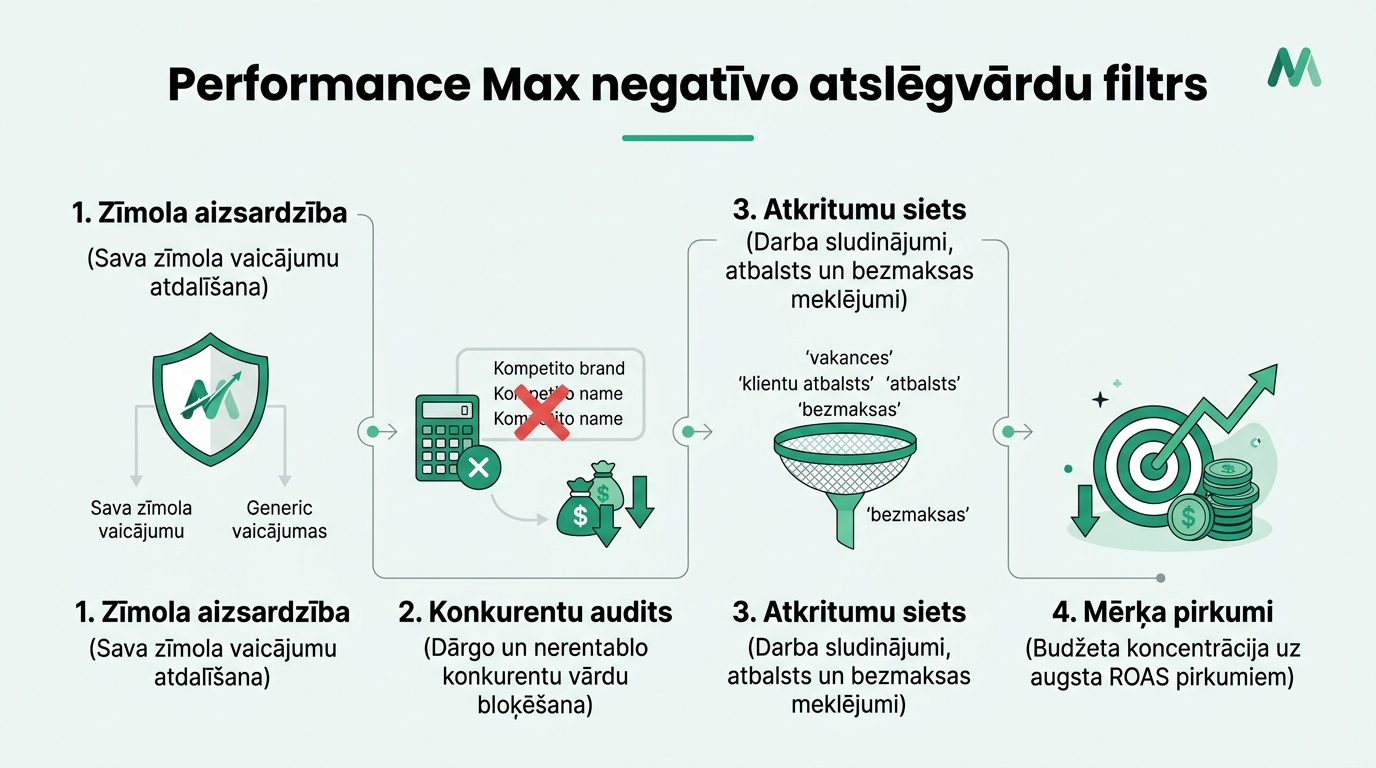
- Blocking Junk Queries: Searches with words like vacancies, free, application, and contacts drive up campaign costs without generating purchases and must be added to negatives immediately.
- Using Search Themes: The new feature lets you manually steer the algorithm into the right product categories, accelerating the learning process without unnecessary experiments.
Why Performance Max Can Waste Money on Unnecessary Clicks
The primary task of the PMax algorithm is to find conversions (where accurate data passing from GA4 and Google Tag Manager is crucial) based on Target CPA or Target ROAS. The algorithm looks for the easiest path to achieve this goal. If a user enters your exact company name in Google Search, they already planned to make a purchase anyway. The PMax campaign intercepts this user, shows an ad, and claims credit for the conversion.
As a result, the advertiser pays for clicks that organic search or a cheaper brand search campaign would have naturally delivered. At the same time, the budget gets spent on peripheral queries like company details, customer support phone numbers, or job opportunities. Stopping this requires strategic negative keyword management.
How to Control Budget: Digital Advertising and Negative Words
Unlike classic Search campaigns, where negative words can be added within seconds directly at the campaign level, PMax requires a specific approach:
1. Account-level Negative Keywords: The Google Ads account settings (Settings -> Account Settings) feature a section for entering negative keywords. Words entered here automatically apply to ALL account campaigns, including PMax and Shopping. General junk words like free, torrent, reviews, job, and vacancy should be placed here.
2. Brand Exclusions: In 2023, Google finally introduced an official brand exclusion feature directly in PMax campaign settings. Create a list of your brand and its variations and add it as an exclusion, forcing PMax to search ONLY for new customers without prior brand recognition.
3. Google Support Engagement for Specific Lists: If you want to exclude a specific negative keyword list from just one PMax campaign (for example, to prevent one product line from competing with another), you can still achieve this by submitting a request to Google Ads support via chat or email.
Mandatory Negative Keyword Checklist for E-Commerce Stores
Before increasing your PMax daily budgets, make sure you have blocked these four query categories:
| Category | Keyword Examples | Risk Level | Budget Impact |
|---|---|---|---|
| Employment and Service | vacancies, job, salary, details, phone | Very High | Visitors are looking for work or help, not buying |
| Used Goods and Rental | used, marketplace, secondhand, rental, lease | High | Buyers do not want new products at full price |
| Free and Piracy | free, gratis, torrent, crack, pdf | Critical | 100% wasted clicks without purchase potential |
| Low-Price Searches | cheapest, on sale, discount, budget | Medium | Attracts audiences with extremely low purchasing power |
Configuring Search Themes Correctly
To help the algorithm find the right buyers after filtering out unwanted queries, use PMax search themes. You can add up to 25 search themes to each Asset Group. Specify exact terms that highlight the strengths of your offer and address buyer pain points. This ensures that your saved budget is directed toward high-quality target traffic.
Frequently Asked Questions
Will blocking brand names in PMax decrease total sales volume?
Sales volume will not decrease if you simultaneously capture brand queries with a separate standard Search campaign, where the cost-per-click is typically below 0.05-0.10 EUR.
How quickly do changes take effect after adding negative words?
Account-level negative words usually take effect within a few hours, completely stopping ad delivery for blocked phrases.
Where in PMax reports can you see the search terms your ads actually appeared for?
Go to Insights & Reports -> Search Terms Insights (as analyzed in our study on the future of Performance Max campaigns). There, Google groups search queries into themes and displays their conversion metrics.
Do match types (Broad, Phrase, Exact) work for PMax negative keywords?
Yes, all standard match types - broad, phrase, and exact match - work precisely for negative keywords.
Want to stop wasted clicks in your Performance Max campaigns?
Schedule a 15-minute campaign audit call. We will review your negative keyword lists and increase your ROAS.
Fixed budget. No hidden fees or pushed services.