

Your website menu must be instantly intuitive for mouse, mobile thumb, and keyboard navigation (WCAG 2.1 AA compliance). A mega menu with structured categories and visible sub-services eliminates friction, guiding visitors directly to your calculator or contact form. Explore our web development standards.
Thoughtful navigation, a hallmark of professional web development, acts as your site's signposting: if a visitor cannot immediately find the service or pricing page they need, they will simply close the tab and head to a competitor. Companies often try to show "everything at once" by stuffing headers with dozens of links and complex multi-level dropdowns. The result is user confusion and low conversion rates. A well-planned navigation architecture is a fundamental requirement for the success of any digital project.
Key Takeaways
- The 3-Second Rule: Within 3 seconds of landing, a visitor must understand where they are and how to reach the service or product they are looking for.
- Hierarchy Simplicity: The main menu should contain no more than 5 to 7 primary items; an overloaded header leads to decision paralysis (Hick's Law).
- Mobile Hamburger UX: On mobile devices, the menu must be easily reachable with one hand, featuring clear arrows for sub-menus and large touch targets.
- The Dual Role of Breadcrumbs: Breadcrumb links not only help users return to previous categories but also create a clear structure for Google search bots.
Hick's Law and Cognitive Load in Navigation
In UX improvement, where in-depth user behavior and UX analytics are essential, there is a famous psychological principle: Hick's Law. The more choices a person is offered simultaneously, the longer it takes to make a decision, and the probability of no decision being made at all increases.
If your site header contains 12 buttons of equal visual weight, the visitor's eyes will dart chaotically between them. Best practice is to limit the primary menu to 5 or a maximum of 7 logical blocks: Home, Services (or Shop), About Us, Pricing, Blog/Resources, and Contact. Everything else should be organized into secondary sub-menus or the footer.
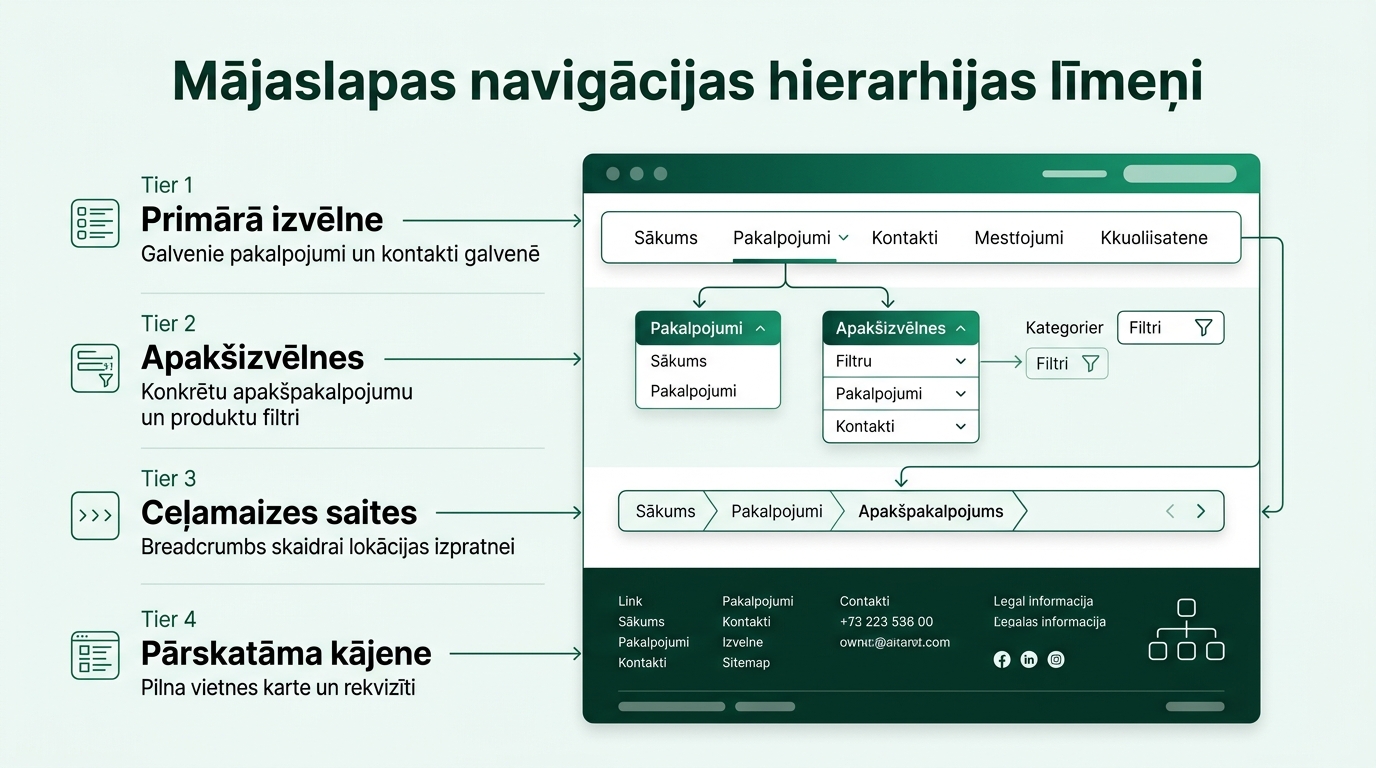
Mega Menus vs. Classic Dropdown Lists
For e-commerce stores and large portals with hundreds of product categories, standard narrow dropdown lists are extremely inconvenient, as they often go off-screen or disappear at the slightest mouse cursor deviation. In such cases, the best solution is a Mega Menu:
Advantages of Mega Menus: They open as a full-width panel where categories are arranged in columns with clear headings, small icons, and even highlighted promotional banners or featured products. The user can grasp the entire range of offerings at a glance without needing to click through five different levels.
Mobile Ergonomics and the 'Thumb Zone'
Since the majority of visitors browse sites from smartphones using one hand, navigation ergonomics in a mobile environment are of critical importance:
| Navigation Element | Bad Practice | Best Practice |
|---|---|---|
| Hamburger Icon | Too small (under 30px), hard to tap | At least 44x44px touch area with 'Menu' text |
| Sub-menu Opening | Page reloads upon clicking the category | Clear arrow icon that expands the list downward |
| Call Button & CTA | Hidden deep in the contact page | Floating bar at the bottom of the screen with a direct call button |
| Search Bar | Tiny magnifying glass icon without text | Visible search field with auto-suggestions |
The Role of Breadcrumbs in Navigation and SEO Optimization
Breadcrumbs are a text path at the top of the page that shows the user's journey: Home > Services > Web Development > WordPress Sites.
This element serves two fundamental purposes: first, it allows the visitor to return one level up with a single click if the specific service isn't exactly what they were looking for; second, when correctly marked up with Schema.org BreadcrumbList data, these links appear directly in Google search results, replacing the ugly URL address with a clean, hierarchical navigation path.
Footer Architecture as a Safety Net
The footer is not just a place to put a copyright line. It is the "second breath" of your page. Users who have scrolled to the very bottom haven't found the answer in the main text. The footer must provide a full site map, company details, business hours, links to the privacy policy, and a quick contact form.
Frequently Asked Questions
Should the main menu be sticky while scrolling?
Yes, a moderately sized sticky menu improves navigation speed because the user does not have to scroll back to the top of the page to move to a different section.
How many levels deep should site navigation be?
Best practice, which we detailed in our guide on internal link architecture and thematic clusters, is not to exceed 3 levels: Main Category -> Sub-category -> Specific Page. A deeper structure creates confusion and hinders indexing.
Is it mandatory to have a 'Home' button in the menu?
Most users already understand that clicking the company logo takes them to the homepage, but the text 'Home' is still useful for older audiences.
What colors should I choose for the active navigation item?
The active item should be clearly highlighted with your brand's accent color (e.g., emerald green) and an underline, so the user always knows their current location.
Do your website visitors easily find the service they need on mobile and desktop?
Book a 15-minute UX consultation. We will discuss simplifying your site's navigation and shortening your conversion path.
Fixed budget. No hidden fees or forced services.