
A historical publication from October 2020 regarding the announcement of GA4. Today, Universal Analytics is fully shut down, and GA4 is the sole standard featuring an event-based data model and server-side tracking. To organize measurements on your website, check out our Automation and Data Integration Solutions and Google Ads Services.
Key Takeaways
- New Data Standard: In October 2020, Google officially announced Google Analytics 4 (GA4), becoming the default analytics platform for all new properties.
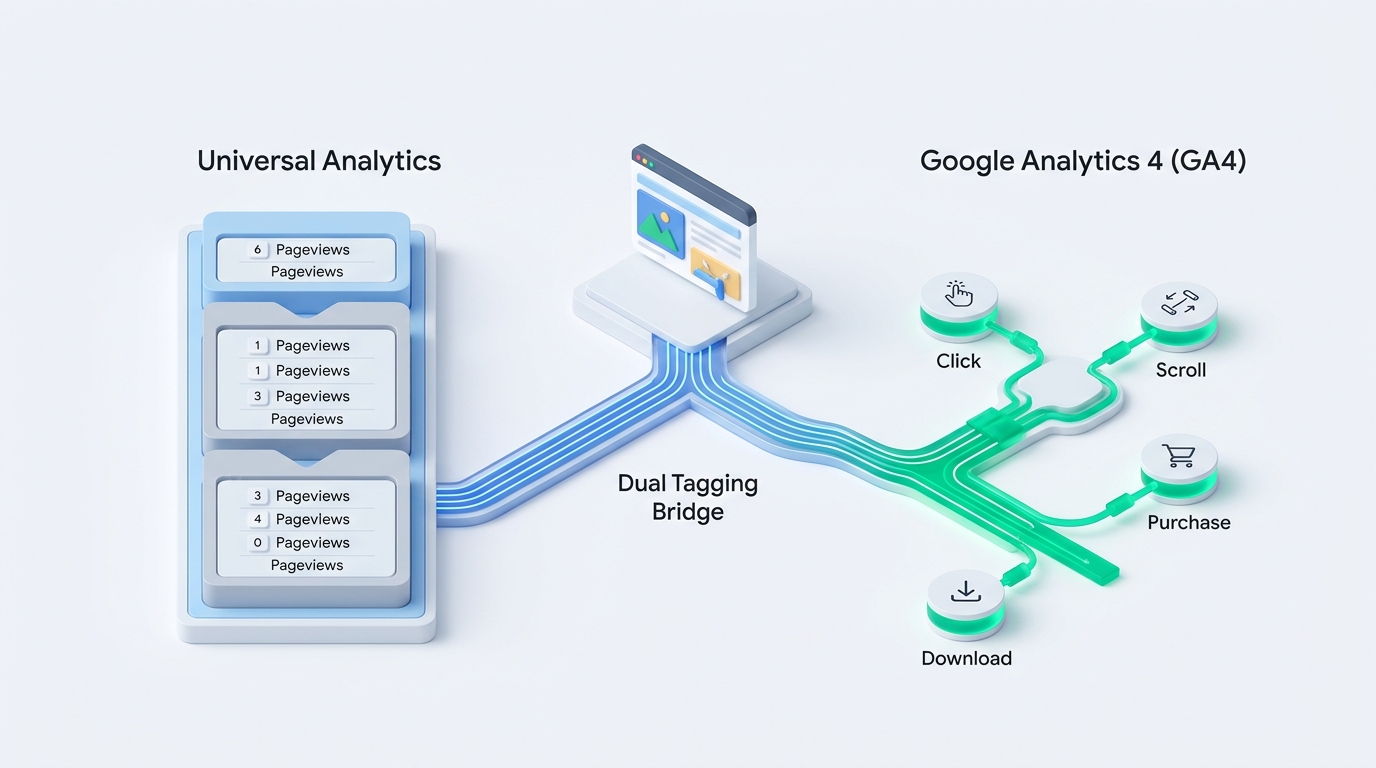
- Event Model: Unlike Universal Analytics sessions and pageviews, GA4 treats every interaction (click, scroll, purchase) as an independent event.
- Future-Proofing: GA4 is built with stricter privacy regulations and the gradual phase-out of third-party cookies in mind, utilizing machine learning models to fill data gaps.
- Golden Rule for Businesses: Do not abandon Universal Analytics today. Set up dual tagging so GA4 can start building historical data early.
Imagine you own a reliable station wagon that has served you for years. It accurately counts how many people stepped inside and how many kilometers the car has traveled. But suddenly, an electric car appears in town equipped with telemetry sensors that record not only passengers, but every steering wheel turn, battery efficiency, and even the music passengers are listening to. This is precisely the leap that has just occurred in the world of digital analytics.
On October 14, 2020, Google officially made a long-awaited announcement: the "App + Web" platform, which had been in beta for over a year, is becoming the official next standard named Google Analytics 4 (GA4). If you open Google Analytics and want to create a new account, the system already offers GA4 as the primary choice today.
Why was this step inevitable, what does it practically mean for website owners, and why is there no reason to panic? Let us walk through all the key points step by step.
Why the Old Universal Analytics Can No Longer Keep Up
The previous Universal Analytics (recognized by many through the UA-XXXXX identifier) is fundamentally based on technology created way back in 2005 (then known as Urchin). At that time, internet usage was simple: a person sat down at a desktop computer, opened a browser, and clicked through pages. Each page load request (pageview) formed a session.
Today, reality is drastically different:
- Multiple Devices per User: A person views a product on a phone in the morning, on a work computer at noon, and makes a purchase on a tablet or mobile app in the evening. In the old system, these were often counted as three completely distinct users.
- Privacy and Cookie Limitations: Browser privacy enhancements (Apple ITP, Firefox ETP) and GDPR data protection regulations mean that traditional analytics cookies are blocked or deleted much more frequently.
- Interactive Single Page Applications (SPAs): On modern websites, content often loads dynamically without a full page reload. The old pageview logic becomes inadequate here.
Universal Analytics vs. Google Analytics 4: Key Differences
To understand the core essence, let us examine how both systems view the exact same user visit:
| Feature / Principle | Universal Analytics (UA) | Google Analytics 4 (GA4) |
|---|---|---|
| Data Model | Sessions and pageviews (Hit Types: pageview, event, social, transaction). | Everything is an Event with attached Parameters. |
| User Stitching | Based on device Client ID cookie; difficult to combine website and mobile app. | Combines User ID, Google Signals, and device data into a unified stream (Web + App). |
| Automatic Tracking | Requires manual code or Tag Manager configuration for every event. | Enhanced Measurement automatically tracks scrolls, video views, and file downloads. |
| BigQuery Integration | Available only in the expensive enterprise version (Google Analytics 360). | Free export to BigQuery available to all users. |
| Bounce Rate | Traditional metric (single page view without further interaction). | Replaced by Engagement Rate, which is significantly more informative. |
What Businesses Should Do Today: The Golden Rule of Dual Tagging
The most common mistake an inexperienced marketing specialist can make right now is hastily removing the old Universal Analytics code and fully switching to GA4. Do not do this!
GA4 is currently a new product. Its user interface is still evolving, many familiar reports are located elsewhere, and integrations with third-party tools are still being refined. Furthermore, transferring historical data from Universal Analytics to GA4 is impossible because the data structures are completely different.
The only correct and professional approach right now is Dual Tagging:
- Keep Existing Universal Analytics: It continues to provide daily reports, campaign performance metrics, and clear visitor data.
- Add the New GA4 Property: Using Google Tag Manager, also insert the new GA4 configuration tag into your website.
- Let GA4 Collect Data in the Background: When GA4 becomes the main and only tool in a year or two, you will already have a fully accumulated historical database for year-over-year (YoY) comparisons.
Technology changes always cause a bit of anxiety, but in this case, it is a great opportunity to organize your digital infrastructure. If you are unsure how to correctly configure dual tagging or connect it with your e-commerce solution, explore our digital marketing guides and implement the new tools thoughtfully!
Frequently Asked Questions about Google Analytics 4 (GA4)
Will the old Universal Analytics be shut down soon?
In the foreseeable future - no. Millions of businesses worldwide use Universal Analytics daily, and Google recognizes that the transition period will take several years. However, all new machine learning innovations are being invested exclusively into GA4.
Will running two analytics codes simultaneously slow down the website?
If you use Google Tag Manager or asynchronous libraries, the performance impact is practically unnoticeable (a few milliseconds). Data transmission occurs in the background and does not block the visual rendering of the page in the visitor's browser.
What is the biggest benefit of GA4 for a small business?
Enhanced automated event tracking (Enhanced Measurement). You no longer need to write complex code to see scroll depth, outbound clicks, or file downloads - GA4 tracks them automatically.
Need precise and reliable GA4 data analytics on your website?
We will help you correctly configure conversions, e-commerce tracking, and Google Tag Manager settings for complete business control.
Fixed budget. No hidden extra charges or forced services.