

GSC indexing reports provide a direct answer to how Google views your site: 404 errors, canonical link conflicts, or faulty breadcrumbs directly damage your site's ranking. Regular error audits and IndexNow notifications ensure immediate content updates. Learn more in our technical SEO audit section.
Google Search Console (GSC) is a vital tool that we evaluate in detail during every technical SEO audit, as it shows exactly how search engine bots perceive your site. However, the 'Page Indexing' section causes confusion for many. Seeing thousands of pages with the status 'Not indexed' often triggers panic. In reality, a large portion of these notifications is normal site behavior, but critical errors that prevent your most important content from appearing in search results are often hidden among them.
Key Takeaways
- Evolution from Index Coverage to Page Indexing (similar to what we discussed in our article on instant WordPress content indexing): Google has modernized the indexing report, clearly separating pages that are indexed from those excluded intentionally or due to errors.
- Discovered vs. Crawled - currently not indexed: The 'Discovered' status means Google knows about the page but hasn't visited it yet due to crawl budget constraints; 'Crawled' means the page was visited, but the content quality was insufficient for indexing.
- Canonical link conflicts (which require regular website SEO optimization to resolve): A common error in e-commerce stores is filter and sorting links appearing in search, creating thousands of duplicate URLs that Google refuses to index.
- Error prioritization: Not every excluded URL is an error; administrative pages, shopping carts, and internal search links should be marked with a 'noindex' tag.
How the Google Search Funnel Works: Discovery, Crawling, and Indexing
For a page to receive traffic from Google, it must pass through three mandatory stages:
1. Discovery: The Google bot (Googlebot) learns about the existence of a new URL via an XML sitemap (sitemap.xml) or through an internal link from another page.
2. Crawling: The bot sends a request to the server, where stable website maintenance and server hosting guarantee a fast response, loads the HTML code, styles, and JavaScript files, and reads the page content.
3. Indexing: The crawled content is parsed, analyzed, and added to Google's massive search database. Only indexed pages can compete for positions in search results.
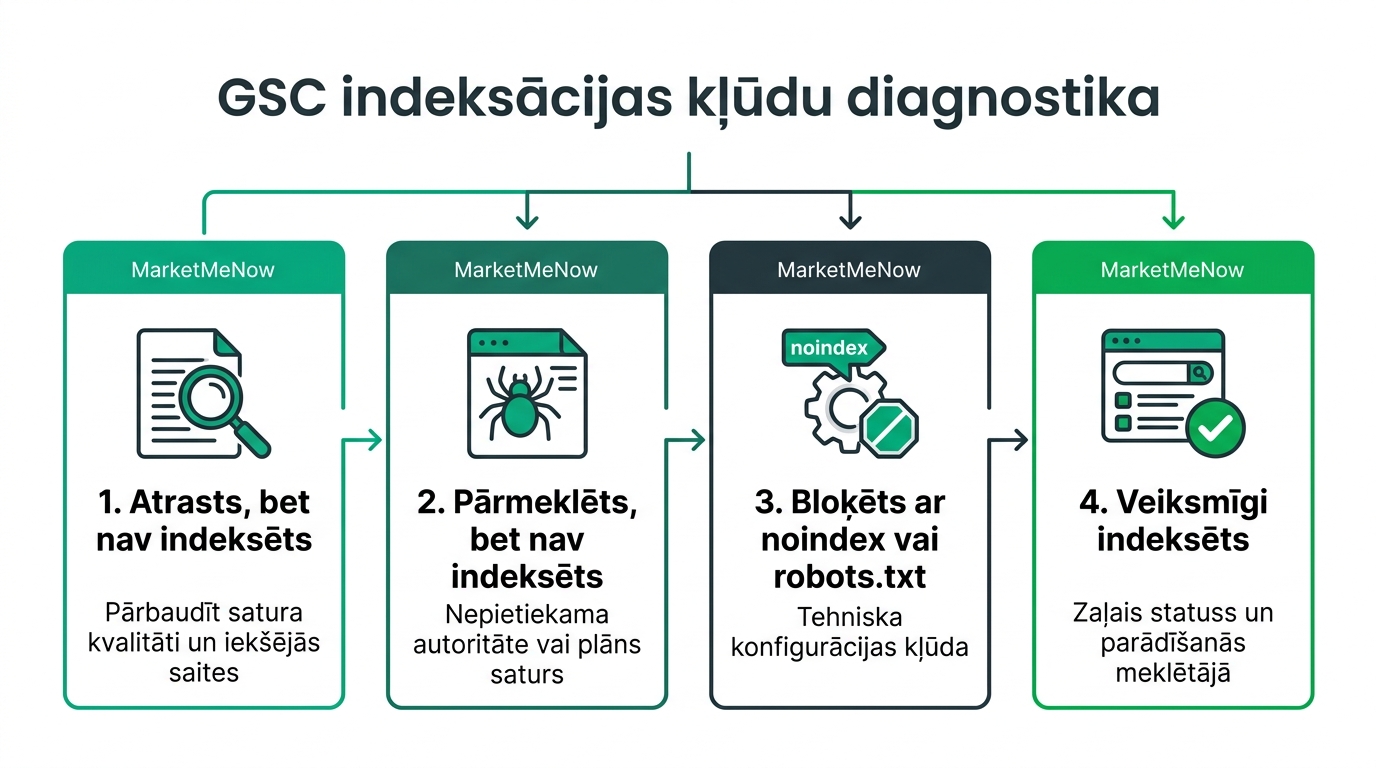
Decoding Common Indexing Statuses and Solutions
Let's look at the four most common notifications webmasters encounter:
| GSC Status | What it actually means | Cause | Recommended Action |
|---|---|---|---|
| Discovered - currently not indexed | Google knows the address but hasn't visited it | Crawl budget limitations or weak internal linking structure | Add links from popular articles, organize sitemap.xml |
| Crawled - currently not indexed | Google visited the page but decided not to include it | Thin content, low value, or duplicate content | Enhance content with unique expertise, merge similar articles |
| Excluded by 'noindex' tag | The page contains a noindex directive for bots | WordPress setting or SEO plugin configuration | If the page is important, remove the noindex meta tag |
| Page with redirect | The address redirects to another location (301/302) | Changed URL or moved e-commerce product | Ensure sitemap.xml does not contain redirecting links |
Practical Steps to Accelerate Page Indexing
If a new article or important service page hasn't been indexed for weeks, follow these steps:
Use the 'URL Inspection' tool: Paste the exact address into the top search bar of Search Console and click 'Test Live URL'. This test will check the page's live response in real-time and show if there are any technical obstacles (such as blocked resources or faulty canonical tags). If everything is fine, click 'Request Indexing'.
Strengthen internal links: Googlebot moves through links. If a new page isn't linked from the homepage or category menu, the bot finds it very slowly. Insert at least 2 to 3 contextual links from your most visited blog posts.
Optimize your XML sitemap: Ensure your sitemap contains ONLY canonical URLs with a 200 HTTP status code. Exclude pages with noindex, 404 errors, or 301 redirects from the map.
The Biggest Stumbling Block for E-commerce: Faceted Navigation
In online stores with filters (color, size, material, price), every filter click generates a new URL with parameters. This can create tens of thousands of worthless addresses that 'consume' all of Googlebot's crawl resources. The correct solution is to block filter parameters in the robots.txt file or set the correct rel='canonical' link to the main category page.
Frequently Asked Questions
How long does it usually take for Google to index a new page?
For a healthy site with a good reputation, indexing takes from a few hours to 3 days. For new sites, it can take 1 to 2 weeks.
Is a 100% indexing rate mandatory?
No! For most sites, it is perfectly normal for 30% to 50% of addresses not to be indexed, as these are service pages, checkout steps, or technical redirects.
What to do if the 'Request Indexing' button no longer works?
Google limits the number of manual indexing requests per day (approximately 10-15 requests). The best solution is to organize internal links, which encourages the bot to return naturally.
Conclusions and Next Steps
A regular monthly audit of the Search Console page indexing report protects your site from invisible errors. Keep an eye on the 'Crawled - currently not indexed' section to timely identify content that needs improvement, and take care of a clean internal link architecture.
Noticed indexing errors or unindexed pages in your Google Search Console?
Request a 15-minute technical audit consultation. We will diagnose errors and fix your site's indexing.
Fixed budget. No hidden fees or forced services.