

The shutdown of Universal Analytics was a critical moment that forced the industry to adopt an event-based measurement model. In 2026, GA4 is powered alongside server-side sGTM and Google Consent Mode v2 to recover data otherwise blocked by browser privacy filters. Learn more in our GA4 and GTM architecture section.
Exactly 70 days remain until July 1, 2023, when Google officially disables data processing for Universal Analytics (UA), which has been used for decades. Despite repeated warnings, hundreds of Latvian and European companies still rely on the old interface or have set up an empty GA4 property without real conversion and e-commerce tracking. Now is the final moment to act to avoid losing historical data and business control.
Key Takeaways
- Irreversible deadline: On July 1, 2023, standard Universal Analytics (UA) properties will completely stop processing new data; without a configured GA4, analytics will halt.
- No automatic history transfer: Google does not transfer historical data from UA to GA4 due to the fundamentally different data models of both platforms; history must be archived manually.
- Event-based architecture: GA4 no longer uses a hierarchy of sessions and page views, but rather a flexible event-based model where every action is an independent event.
- E-commerce and goal audit: All previous goals must be converted into GA4 conversions and e-commerce purchase accuracy must be verified before shutting down the old system.
Why Historical Data Will Not Be Automatically Transferred
The most common misconception among business leaders is the belief that "Google will transfer everything automatically." Unfortunately, this is technically impossible. Universal Analytics relied on sessions and page views, whereas Google Analytics 4 is built on events and user parameters.
Because these two data structures are mathematically incompatible, Google Analytics 4 starts collecting data only from the moment the tracking code is added to it. If your GA4 property was activated just yesterday, you have no way to see sales dynamics from 2022 or 2021 within it. Therefore, exporting historical data from UA is an urgent task.
 GA4 and GTM implementation and data recovery" class="wp-image-4343" />
A Four-Step Plan for Data Recovery Before the Deadline
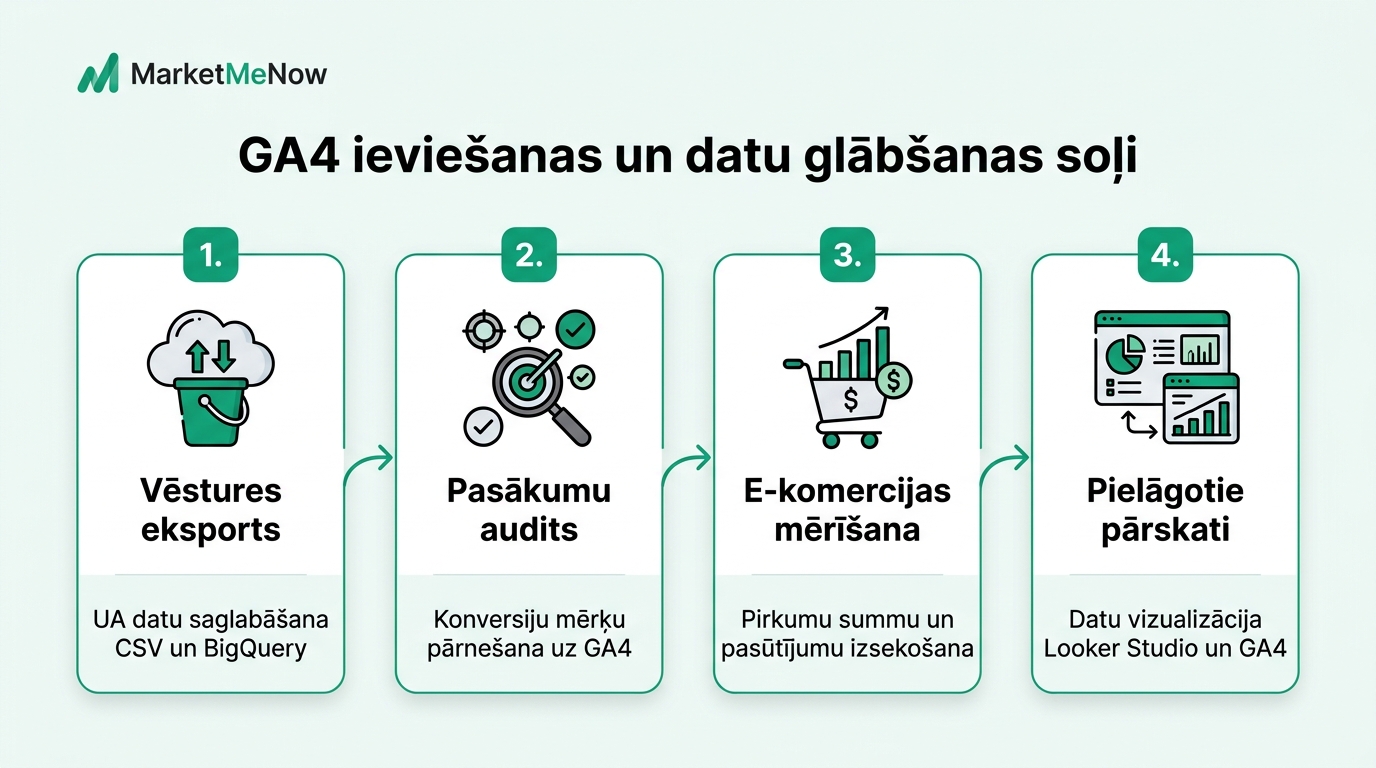
To ensure that your company is not left without analytics and comparative statistics after July 1, follow this checklist:
1. Exporting historical summaries from UA: Use the Google Sheets plugin "Google Analytics Spreadsheet Add-on" or manual export in CSV and PDF formats. Save monthly summaries of visitor sources, top landing pages, channel profitability, and conversion rates for the past 3 to 5 years.
2. BigQuery integration: One of the biggest advantages of GA4 is the free direct integration with Google BigQuery cloud storage. By connecting BigQuery today, all raw event data will be automatically backed up in your private database, eliminating future data aging limits.
3. Event and conversion alignment: Check that all major business goals - application form submissions, call clicks, email links, purchase confirmations - are registered as conversions in GA4. Make sure names match Google recommended standards (for example, generate_lead, purchase, add_to_cart).
4. E-commerce data and revenue tracking audit: Observe and compare data between UA and GA4 for at least two weeks. Since GA4 uses different session calculation logic, a small difference (usually 5 to 10 percent) is normal, but the number of purchases and turnover must match your CMS or accounting system.
Key Differences Between UA and GA4 Reports
| Feature | Universal Analytics (Old) | Google Analytics 4 (New) |
|---|---|---|
| Data Model | Sessions and page views | Events and parameters |
| Bounce Rate | Session with 1 page view | Replaced by Engagement Rate |
| Cross-device tracking | Limited, cookie-based | Advanced, User-ID and Google Signals based |
| Report Customization | Fixed standard reports | Total freedom with the Explorations tool |
| Data Retention Period | Unlimited | Standard 2 months (must be increased to 14 months!) |
Important setting: By default, the GA4 data retention period for detailed reports is set to only 2 months! Be sure to go to Admin -> Data Settings -> Data Retention and change this value to 14 months.
How to Handle Google Ads Campaigns and Audiences
If your Google Ads campaigns use goals imported from Universal Analytics, ad optimization will stop on July 1. You must immediately import new GA4 conversion events into Google Ads and gradually switch campaign Smart Bidding to the new goals.
Frequently Asked Questions
Report retention (as reported in our material on how the Universal Analytics era was concluded):
Google has announced that access to historical data in the UA interface will be retained for at least 6 months (until the end of 2023), after which data may be permanently deleted.
Why does GA4 show fewer sessions than Universal Analytics?
GA4 defines a session more flexibly and does not end it at midnight or upon the appearance of a new campaign parameter, as UA did. Therefore, the number of GA4 sessions is usually 5 to 10 percent lower, but engagement data is more accurate.
How do digital process and AI automation integrations help?
If you use Google Tag Manager (GTM) or a popular CMS with ready-made plugins, basic setup can be done without code editing, but complex e-commerce benefits from a specialist audit.
What does Engagement Rate mean and how to evaluate it?
Engagement rate measures the percentage of sessions where a user spent at least 10 seconds, viewed 2+ pages, or completed a conversion. A good rate for most websites is above 55-65%.
Want to be confident in your analytics accuracy and conversion tracking?
Book a 15-minute call. We will conduct an audit of your GA4, GTM, and server-side tracking.
Fixed budget. No hidden extra fees or pushed services.