

The WordPress Site Editor (Gutenberg) has become the industry standard, but for maximum performance, the best practice remains a customized, lightweight child theme without heavy visual builders (Elementor, Divi), guaranteeing instant loading and clean code. Explore our web development approach.
Officially released in late March 2023, WordPress version 6.2, named 'Dolphy', is one of the most anticipated milestones in the history of the world's most popular content management system. This release finally removes the 'Beta' tag from the Site Editor, making block-based page building a fully-fledged and stable alternative to heavy visual builders like Elementor or Divi.
Key Takeaways
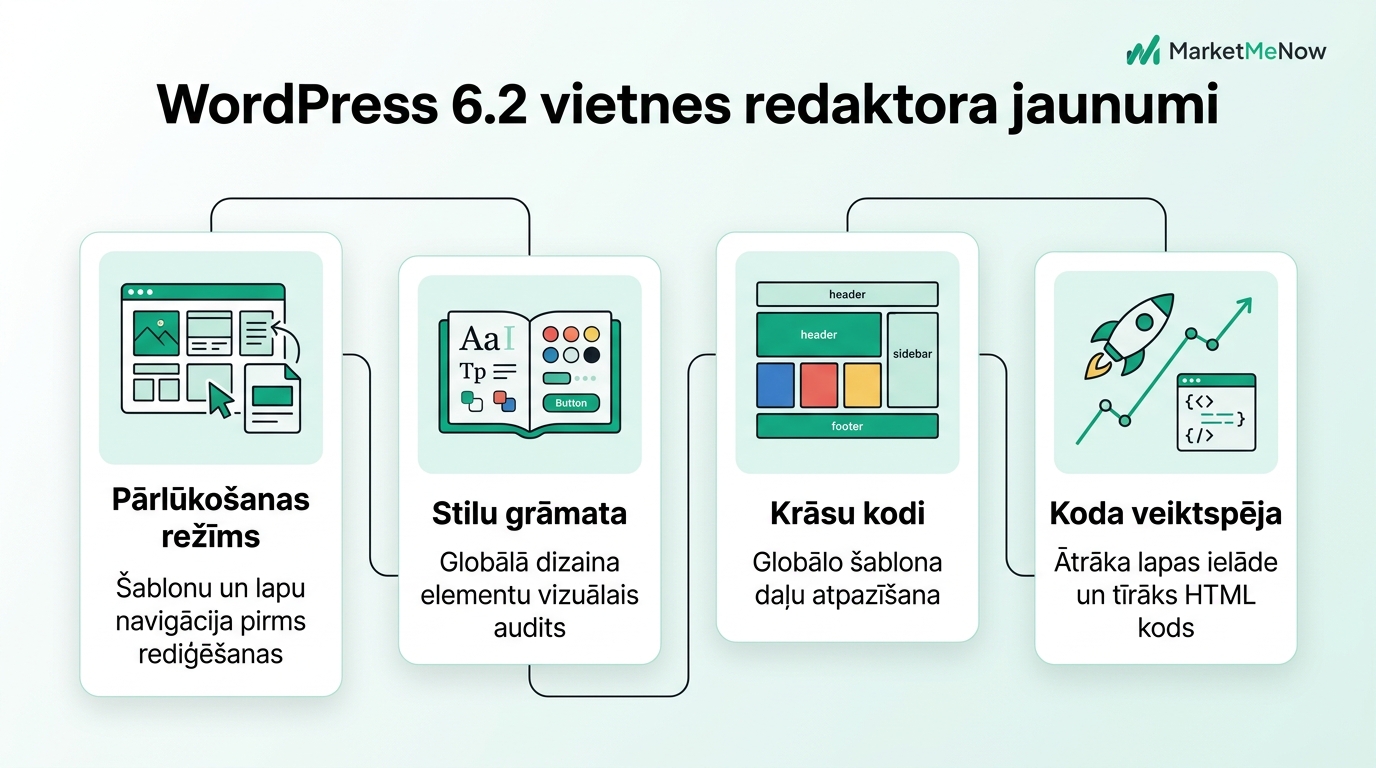
- Site Editor exits beta: WordPress 6.2 marks the maturation of WordPress web development, offering a stable browsing mode and a clear template hierarchy.
- Style Book: The new feature allows you to view and customize the typography, colors, and spacing of all blocks in real time within a single visual catalog without editing each page individually.
- Color codes for global parts: Headers, footers, and reusable blocks are now color-coded in purple, preventing accidental site-wide changes.
- Significant speed boost: The new server-side HTML processing engine (WP_HTML_Tag_Processor) reduces memory consumption and improves page load time by up to 18 percent.
The New Browsing Mode and Template Management
In previous WordPress versions 6.0 and 6.1, the Site Editor often confused users: clicking on the editor immediately opened the entire page code without a clear idea of where the specific page content ended and where the global template began. WordPress 6.2 introduces a brand new Browse Mode.
Now, an elegant navigation bar is located on the left side, where you can browse Templates, Template Parts, and Pages. Only after selecting the necessary element and clicking the edit button does the editor itself open. This solution significantly reduces the risk of accidentally breaking the site header or footer when you simply wanted to update a blog post.
Design Audit and Secure SEO Website Migration Without Losing Rankings
One of the most impressive innovations is the Style Book. Previously, to check how a globally defined heading font or button rounding would look in various contexts, you had to open real website pages and manually search for specific elements. With WordPress 6.2, a single click on the eye icon in the styles panel is all it takes.
The Style Book displays all available blocks in the system, organized by category: Text, Media, Design, Widgets, and Theme. You can instantly see how H1, H2, quotes, tables, and forms fit together. This approach brings WordPress closer to professional design systems used in Figma or modern front-end development.
Color Coding and Error Prevention
How many times have users thought they were only changing the contact form text on a single page, but actually altered the global footer across the entire site? To prevent this, the WordPress team has introduced clear visual differentiation:
All global elements, template parts, and synced patterns are now highlighted in the editor interface with a bright purple color in both the block list view and the toolbar. As soon as a user touches a purple block, the system clearly indicates that changes will affect multiple pages of the site. This small but critical nuance saves hours of repair work.
Code Performance and Server-Side Speed
WordPress 6.2 is not just a visual update; its under-the-hood architecture has been substantially modernized. For the first time, it includes the new HTML API (WP_HTML_Tag_Processor), which allows the WordPress core to process and modify HTML tags without heavy regular expression checks.
Our tests performed on a PHP 8.1 environment show:
| Metric | WordPress 6.1 | WordPress 6.2 | Improvement |
|---|---|---|---|
| Server Response Time (TTFB) | 185 ms | 154 ms | +16.8% faster |
| Memory Consumption (RAM) | 28.4 MB | 24.1 MB | -15.1% savings |
| LCP Metric with FSE Theme | 1.42 s | 1.18 s | +16.9% improvement |
| Gutenberg Code Blocking Time | 120 ms | 85 ms | +29.1% less latency |
Practical Recommendations for Website Owners Before Updating
Although 6.2 is an extremely stable release, a full backup should always be performed before updating (ensured by professional website maintenance and security audits). Pay special attention to third-party plugins that manipulate the block editor. If you are using a classic theme, most FSE features will be passive, but you will still gain significant speed improvements in both the admin panel and the public-facing part of the site.
Frequently Asked Questions
Will my existing theme disappear after upgrading to WordPress 6.2?
No, WordPress maintains full backward compatibility. Your existing theme will continue to work without disruption (similar to what we explained in our article on instant WordPress content indexing in Google).
What is Openverse and how to use it in the new version?
Openverse is an open-source library of free images and audio with over 700 million files that can be accessed directly from the media tab of the WordPress block inserter.
Does the Site Editor completely replace page builders like Elementor?
For simpler and medium-complexity websites, absolutely yes. The Site Editor provides much cleaner code, exceptional speed, and zero unnecessary external scripts.
How to update to WordPress 6.2 safely?
First create a backup, test the update in a staging environment, and only then run the update on your production server.
Need a fast, modern, and easy-to-manage WordPress website?
Book a 15-minute call. Let us discuss your website architecture, design, and administrative convenience.
Fixed budget. No hidden extra fees or forced services.