

The final shutdown of Universal Analytics in July 2024 marked the end of an era in digital marketing. In 2026, companies that proactively set up GA4 and server-side data streams are gaining a significant competitive advantage by making decisions based on continuous and modeled data. Learn more about our data analytics services.
This is the final week to access a legend of digital marketing: Universal Analytics. On July 1, 2024, at 11:59 PM, Google will permanently shut down all UA servers and completely erase decades of accumulated statistics. Many business leaders mistakenly relied on the assumption that historical reports would remain in read-only mode. Google's official announcement is uncompromising: access will be completely cut off, and unexported data will simply vanish. If you do not have a local or cloud archive of your previous years' sales volumes and traffic, these are your final days to take action.
Key Takeaways
- Full System Shutdown on July 1: Google has confirmed that on July 1, 2024, all Universal Analytics properties will be permanently deleted, and access to the interface and API will be completely disabled.
- The Final 120 Hours: For companies that have not yet exported their data, this is the last chance to download key historical reports before they are physically destroyed.
- List of Critical Reports: Priority should be given to source/medium traffic, monthly revenue, landing page behavior, and goal completion metrics over the last 3 to 5 years.
- GA4 Configuration Audit: Simultaneously with UA archiving, you must check your GA4 data retention settings (change from 2 to 14 months) to prevent future data loss.
Why data loss is a direct threat to business stability
Historical data is not a museum exhibit. It is your company's commercial memory. Without it, a business loses the ability to:
• Perform Year-over-Year (YoY) comparisons for seasonal peaks (Midsummer, Black Friday, Christmas).
• Prove the company's digital growth to banks, investors, or potential buyers in the event of a business sale.
• Evaluate the true long-term return on marketing and brand campaigns over several years.
Since the new GA4 system only began collecting data recently, the UA archive is the only bridge to your business's past.
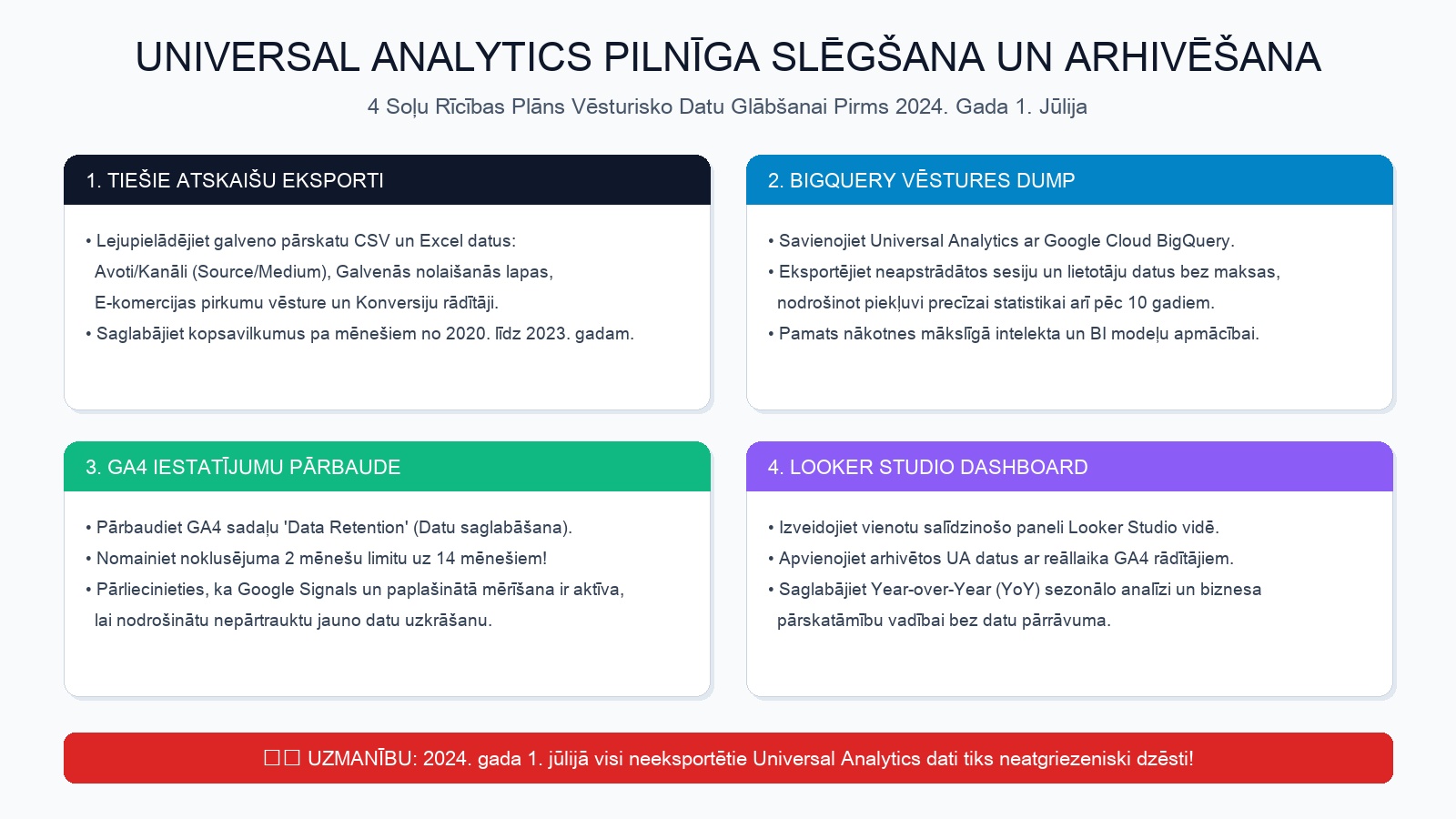
Emergency 4-step rescue plan for your final days
If you haven't done anything yet, take these steps immediately:
| Step | What to export | Format | Time required |
|---|---|---|---|
| 1. Traffic Source Report | Acquisition -> All Traffic -> Source/Medium by month (2020-2023) | CSV / Google Sheets | 15 minutes |
| 2. E-commerce Revenue Data | Conversions -> Ecommerce -> Overview and Product Performance | CSV / Excel | 20 minutes |
| 3. Key Landing Pages | Behavior -> Site Content -> Landing Pages (sessions, bounce rate) | CSV | 15 minutes |
| 4. BigQuery / API Full Dump | Raw archive of all events and sessions for large sites | Cloud Storage / BigQuery | 1 - 2 hours |
While exporting, be sure to take the opportunity to organize your company's GA4 and Tag Manager analytics so that your new data remains reliable.
The critical GA4 setting most people forget
Simultaneously with archiving the old system, check your new GA4 account. Most users do not know that by default, Google GA4 stores detailed user and event data for ONLY 2 MONTHS!
To avoid a situation where you lose data again in a year:
1. Open the GA4 section Admin -> Data Settings -> Data Retention.
2. Change the 'Event data retention' setting from 2 months to 14 months (the maximum standard limit).
3. Enable the free Google BigQuery connection in the GA4 panel so that new data is automatically stored in your cloud server for an unlimited time. This is modern data infrastructure, complemented by smart business process automation.
As we explained a year ago in our article on how the final 48 hours before Universal Analytics data collection ended unfolded, timely action protects against irreversible losses.
Frequently Asked Questions
Can Google support restore my data for a fee after July 1?
Categorically no! Data will be physically deleted from Google's data centers in accordance with global security and privacy policies.
What is the best format to store exported data?
It is recommended to store both raw CSV files in your company's secure cloud and import key data into Google BigQuery so that it can be connected to Looker Studio reports at any time.
Can exported data be uploaded back into a GA4 account?
You cannot upload them directly into the GA4 interface, but in Looker Studio visualizations, they can be seamlessly combined into a single chart alongside GA4 data.
Conclusion
The Universal Analytics era has ended. Spend one hour today downloading your business history and checking your GA4 long-term settings. It is an investment that will ensure your company has clear and continuous visibility into the future.
Do you want a secure, modern, and business-friendly data analytics infrastructure?
Book a 15-minute call. We will help you check and strengthen your website's GA4 and conversion tracking.
Fixed budget. No hidden fees or forced services.