

Saving Universal Analytics data in the first half of 2024 was the final chapter of the old analytics era. In 2026, businesses are fully leveraging GA4 funnel reports and direct BigQuery integrations to make data-driven business decisions. Learn more in our GA4 data analytics services.
With less than 80 days remaining until Google permanently deletes all Universal Analytics (UA) data, the clock is ticking. On July 1, 2024, the legacy system was fully decommissioned, and its interface is no longer accessible, even in archive mode. Many companies mistakenly believed that the transition to GA4 marked the end of the project, forgetting that the last 10 years of marketing statistics, seasonal peaks, and customer behavior trends reside in the old platform. If you do not secure this data now, it will be lost forever.
Key Takeaways
- Irreversible Deadline: July 1, 2024: Google has fully closed access to the old Universal Analytics interface and permanently deleted all historical data.
- Why historical data is irreplaceable: Without historical statistics, a company loses the ability to perform Year-over-Year comparisons for 2021, 2022, and 2023.
- Three export methods: Depending on data volume, you can use manual CSV exports, automated Google Sheets API solutions, or professional BigQuery exports for large websites.
- Unified reports in Looker Studio: Exported historical data can be combined with new GA4 data in a single visualization, maintaining the continuity of business reporting.
Why historical data is critical for business management
Business decision-making is based on trends. To evaluate whether your 2024 Black Friday or Christmas campaign was successful, you need to compare results with previous years. Furthermore, historical data is essential for budget planning, ROI analysis of marketing channels, and company valuation during investor acquisition processes.
Since GA4 and Universal Analytics use completely different data models (session-based vs. event-based), Google does not offer automatic loading of old data into GA4 profiles. The only path is to export the information and store it in an environment controlled by your company.
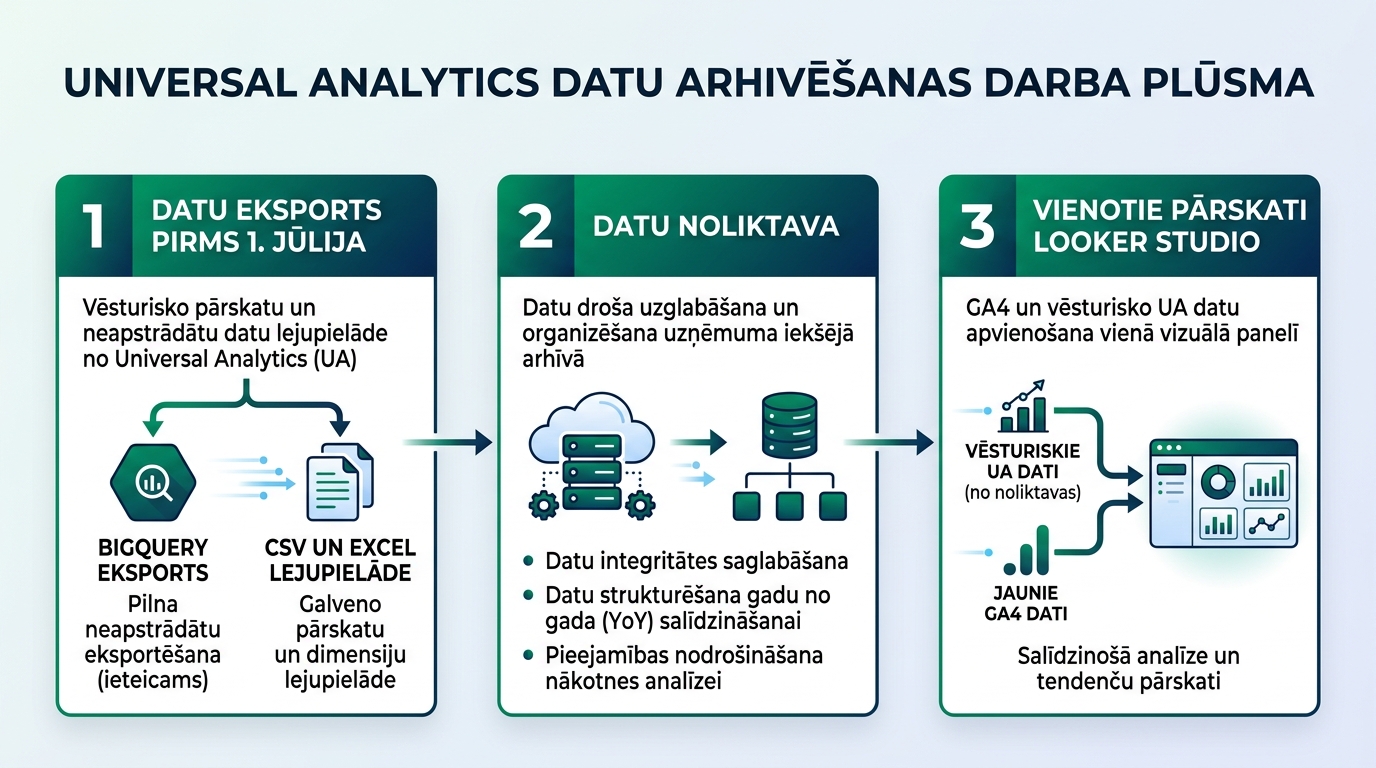
Three reliable methods for data archiving
Depending on your company's resources and data volume, choose the most suitable solution:
| Method | Best for | Advantages | Limitations |
|---|---|---|---|
| 1. Manual CSV / PDF export | Small websites with simple reports | Simple and no additional costs | Labor-intensive, provides only static summaries |
| 2. Google Sheets API extension | Medium-sized businesses | Automated retrieval of key dimensions and metrics | Google Sheets 10 million cell limit |
| 3. BigQuery / Cloud Data Warehouse | Large websites and e-commerce | Full raw dataset, unlimited future analysis | Requires developer or analyst involvement |
For companies with high data traffic, this transition is the perfect moment to organize your entire data analytics infrastructure by creating a unified reporting system.
How to connect historical data with GA4 in Looker Studio
The greatest value is realized when old statistics are not hidden in a forgotten Excel file, but are available in your daily reports:
1. Create a unified data source: Upload exported data to Google BigQuery or a Google Sheets file with clearly defined columns: Date, Channel, Sessions, Users, Revenue, and Conversions.
2. Use Looker Studio Data Blending: Create a timeline where data up to mid-2023 comes from the archived UA source, and from July 2023 onwards - live from your Google Analytics 4 and Tag Manager connection.
3. Implement data automation: Use modern data flow automation so that monthly reports are generated without manual work.
As we warned in our 2022 material on how the Universal Analytics shutdown and transition to GA4 would unfold, a timely prepared archive is a guarantee of peace of mind for any manager.
Frequently Asked Questions
Will it be possible to recover even one UA report after July 1, 2024?
No! Google has clearly stated that all UA data and Properties will be permanently deleted from Google servers.
Which reports are most important to save?
Prioritize exporting: Channel traffic (Acquisition -> Source/Medium), Conversion and e-commerce data by month, Top Landing Pages, and User Geography.
Does GA4 automatically save data for an unlimited time?
Attention: by default, GA4 stores detailed user event data for ONLY 2 months! Ensure you have set data retention to the maximum of 14 months (Admin -> Data Settings -> Data Retention).
Conclusion
Do not postpone Universal Analytics archiving until the last week of June. Preserve your historical experience and combine it with modern GA4 analytics to make data-driven business decisions.
Want GA4 reports where application and sales data are crystal clear?
Book a 15-minute call. We will organize your GA4 event flow and create understandable reports for business decisions.
Fixed budget. No hidden fees or forced services.